Feature Summary
Add attachment files to a PDF document. Multiple file formats are supported.
Feature Details
| Feature Dimension | Description |
|---|---|
| Subscription Limit | Requires subscribing to membership |
| Version Limit | No version limit |
Steps
Attachment Feature
Feature Entry
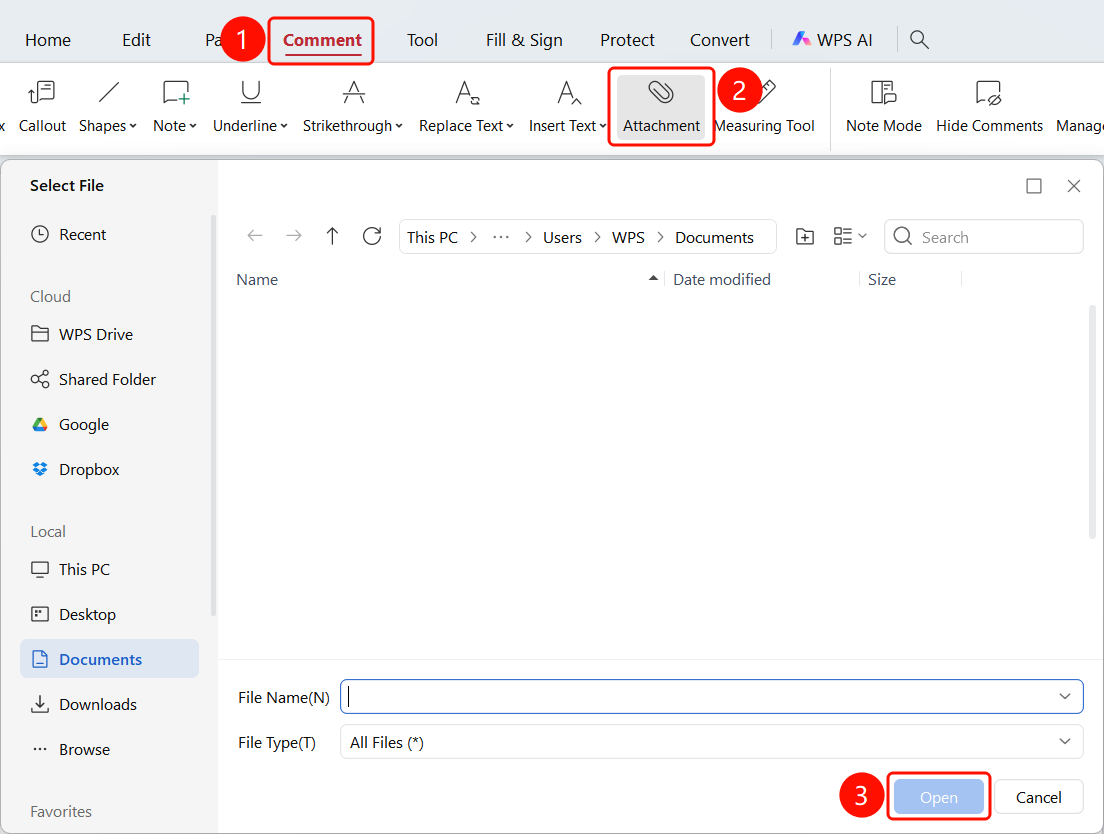
Comment tab > Attachment option > Open button
- Open the PDF document to which you want to add attachments.
- Click the Comment tab in the top ribbon.
- Click the Attachment button in the ribbon.
- Click anywhere in the PDF document.
- Select a file and click the Open button to insert the attachment.
FAQ
Question 1: What formats are supported for attachments?
- Solution: Common file formats such as PDF, Word, Excel, and images are supported.
Question 2: How do I open an attachment?
- Solution: Double-click the attachment icon to open or download the attachment file.
Question 3: How do I delete an attachment?
- Solution: Select the attachment icon and press the
Deletekey.