Feature Summary
Highlight form fields in a PDF document for easy identification and filling.
Feature Details
| Feature Dimension | Description |
|---|---|
| Subscription Limit | Requires subscribing to membership |
| Version Limit | No version limit |
Steps
Accessing the Highlight Fields Feature
Feature Entry
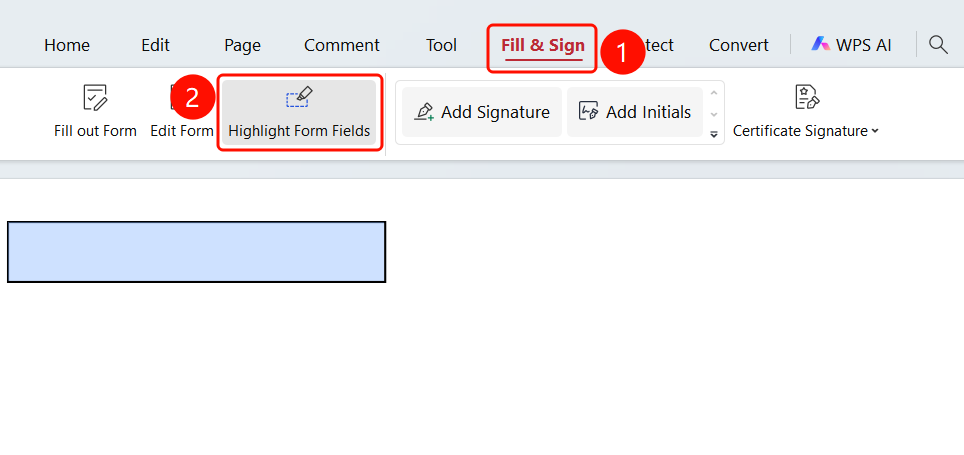
"Fill & Sign" tab → "Highlight Fields" button
- Open the PDF file in which you want to highlight form fields.
- Click the Fill & Sign tab in the top ribbon.
- Click the Highlight Fields button in the ribbon.
- Once clicked, the form fields inserted in the document will be highlighted.
FAQ
Question 1: What does the Highlight Fields feature do?
- Solution: Highlighting form fields makes them stand out in a PDF, making it easier for users to identify and fill them out.
Question 2: How do I cancel highlighting form fields?
- Solution: Click the Highlight Fields button again to disable the highlight.
Question 3: Will highlighting form fields affect printing?
- Solution: The highlight is only visible on the screen and will not affect the printed output.