Feature Summary
Create signature fields in a PDF document for others to apply digital signatures.
Feature Details
| Feature Dimension | Description |
|---|---|
| Subscription Limit | You must subscribe to edit PDF files. |
| Version Limit | No version limits |
Steps
Create a Signature Field
Feature Entry
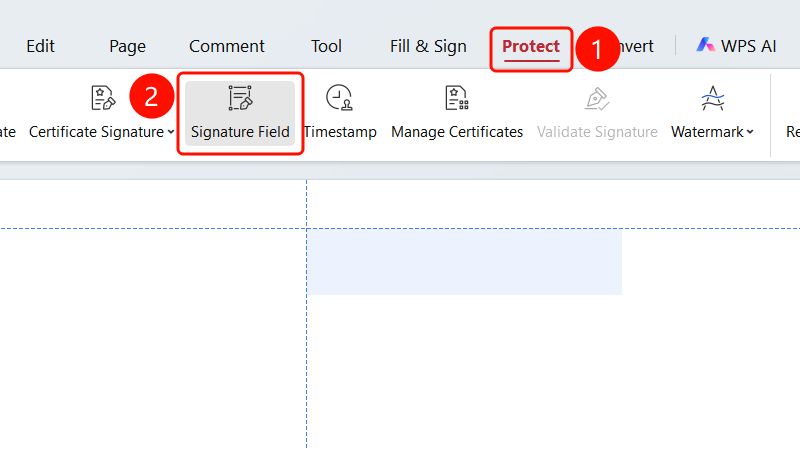
"Protect" tab -> "Signature Field" button
- Open the PDF file where you want to add a signature field.
- Click the Protect tab in the top ribbon.
- Click the Signature Field button in the ribbon.
- Click any area in the document to insert a signature field.
- Click the inserted signature field to perform a Certificate Signature.
FAQs
Question 1: What is the purpose of a signature field?
- Solution: A signature field is used to mark the location where a signature is required, making it easy to apply electronic signatures later.
Question 2: How do I resize a signature field?
- Solution: Right-click the signature field and choose Edit from the shortcut menu to resize it.
Question 3: Can a signature field be deleted?
- Solution: Yes. Right-click the signature field and choose Delete.
Notes
- The signature field will only take effect after it is signed.
- We recommend creating signature fields in advance at the locations where signatures are required.
- The size and position of a signature field can be adjusted.