Feature Summary
Rotate the display orientation of PDF documents. Supports rotating 90 degrees left and 90 degrees right.
Feature Description
| Feature Dimension | Description |
|---|---|
| Membership Limit | Subscription required |
| Version Limit | No version limit |
Steps
Rotate All Pages on the Ribbon
Feature Entry
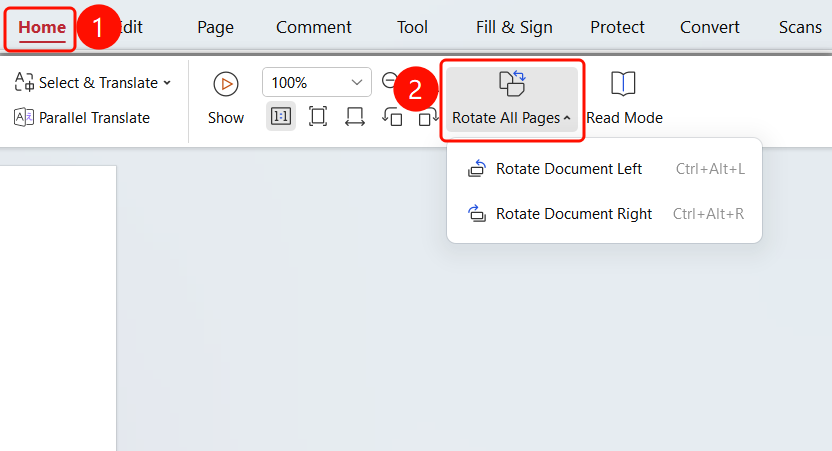
Start tab > Rotate All Pages drop-down menu
Open the PDF file you want to rotate.
Click the Start tab on the top ribbon.
Click the Rotate All Pages drop-down button on the ribbon.
Choose a rotation direction:
- Rotate Left: Rotate 90 degrees left
- Rotate Right: Rotate 90 degrees right
FAQ
Q1: Will rotating the document affect printing?
- Solution: Yes. Rotating the document will affect the printing orientation. Confirm the orientation is correct before printing.
Q2: How do I restore the original orientation?
- Solution: You can rotate the document again to restore its original orientation.
Notes
- Rotating the document only changes the display orientation and does not affect the document content.