Feature Summary
Adjust the page size of PDF documents. Multiple preset sizes and custom sizes are supported.
Feature Description
| Feature Dimension | Description |
|---|---|
| Member Limitation | Subscription required |
| Version Limitation | No version limitation |
Operation Steps
Accessing the Page Size Feature
Feature Entry
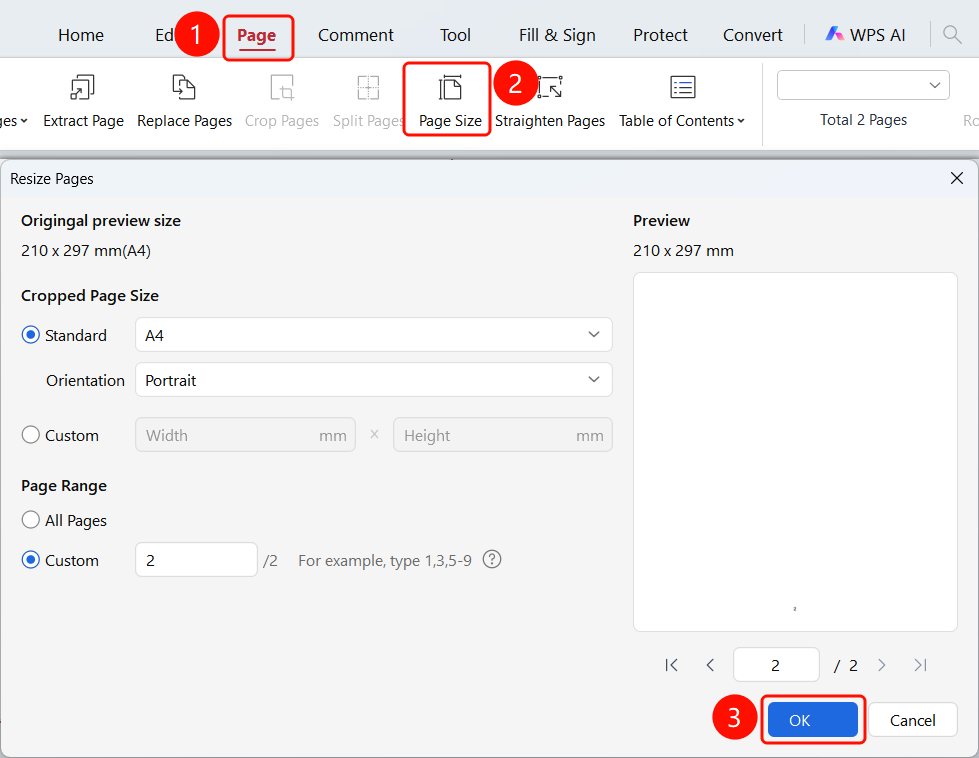
"Page" tab -> "Page Size" button -> "Page Size" dialog box
Open the PDF file whose page size you want to adjust.
Click the Page tab in the top ribbon.
Click the Page Size button in the ribbon.
The Page Size dialog box will pop up.
Adjust the page size in the dialog box:
- Standard Size: Standard paper sizes such as A4 and A3
- Paper Orientation: Portrait, Landscape
- Custom: Customize paper width and height
- Apply to: Set the page range to apply the settings
Click the OK button to complete the settings.
FAQ
Question 1: Will adjusting the page size affect the content?
- Solution: It may affect content formatting. We recommend previewing the effect first.
Question 2: How do I adjust only some of the pages?
- Solution: Select the specified pages in the page range.
Question 3: Which preset sizes are supported?
- Solution: Common paper sizes such as A4 and A3 are supported.