Feature Summary
The bold feature can display cell content in bold, making important content more prominent and eye-catching. It is commonly used for titles, headers, or data that needs emphasis.
Feature Description
| Feature Dimension | Description |
|---|---|
| Membership Restriction | No membership restriction |
| Version Restriction | No version restriction |
| Shortcut Key | Ctrl + B |
Operation Steps
Bold via Toolbar Button
Feature Entry
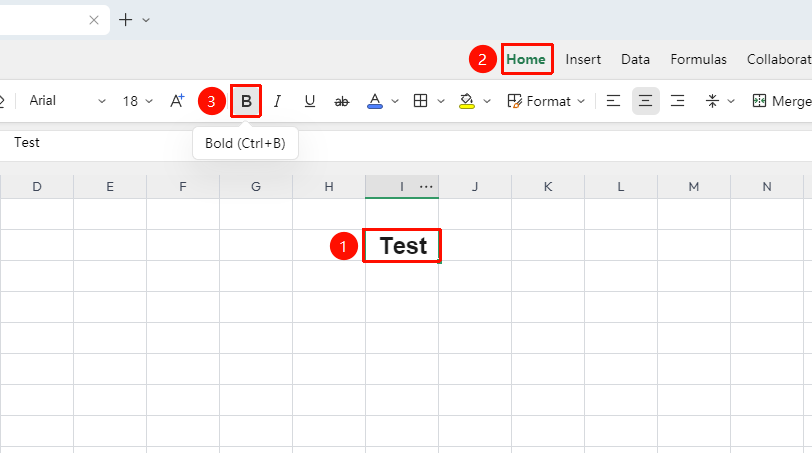
"Home" tab → "Bold"
- Select the cell or part of the text within the cell that you want to bold
- Click the "B" icon in the font toolbar of the "Home" tab
- The text immediately becomes bold; click again to remove bold
Bold via Shortcut Key
Feature Entry
Shortcut key Ctrl + B
- Select the cell or part of the text within the cell that you want to bold
- Press the shortcut key
Ctrl + Bto apply bold - Press
Ctrl + Bagain to remove bold
Quick Setting via Floating Toolbar
Feature Entry
Right-click floating toolbar after selecting content
- Select the text content in the cell and right-click
- The floating mini toolbar automatically appears
- Directly click the bold option in the toolbar to complete the setting

Bold via Format Cells
Feature Entry
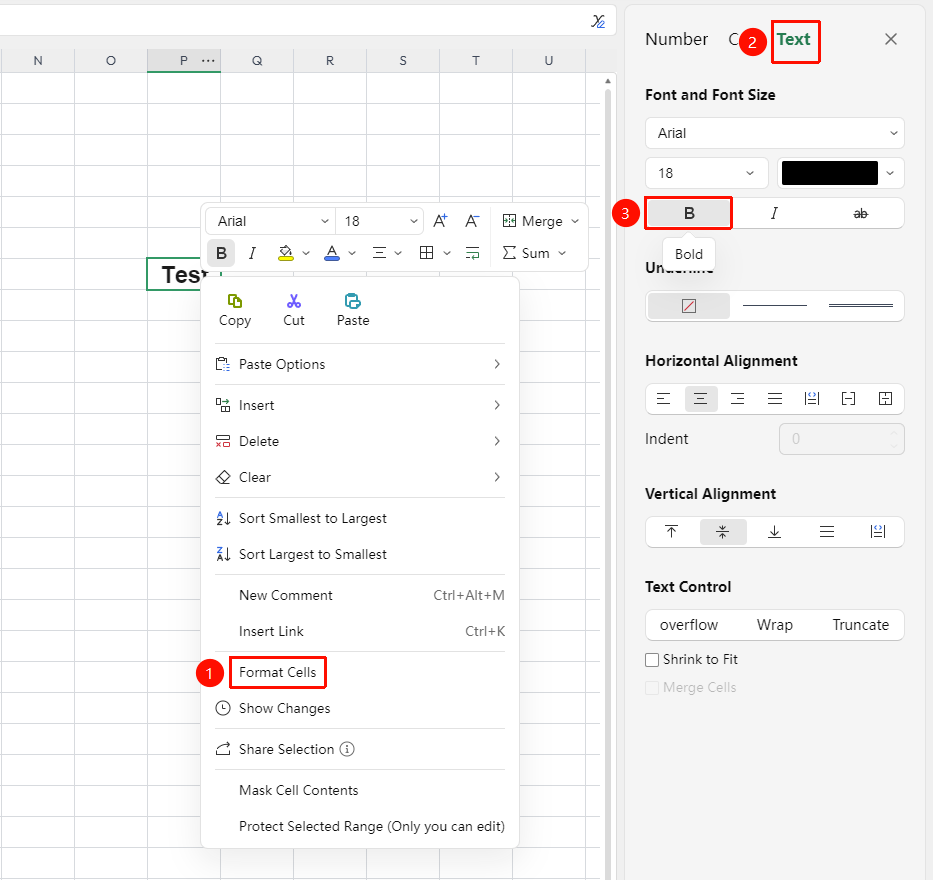
Right-click → "Format Cells" → "Font"
- Select the target cell range
- Right-click and select "Format Cells" (or press
Ctrl + 1) - In the "Font" tab, select "Bold"
- Click "OK" to apply the setting
Frequently Asked Questions
Q1: The bold effect is not obvious
- Solution: Some fonts are inherently thin, so the bold effect may not be obvious. Try switching to a font with thicker strokes, or increase the font size at the same time.
Q2: How to bold only part of the text in a cell
- Solution: Double-click the cell to enter edit mode, select the part of the text you want to bold, then press
Ctrl + Bor click the bold button.
Notes
- In online collaboration mode, bold settings are synced to all collaborators in real time
- Bold can be used simultaneously with other formatting (italic, underline, and so on.)
- Click the bold button again or press the shortcut key to remove the bold effect
- Some special fonts may not support bold effect