Feature Summary
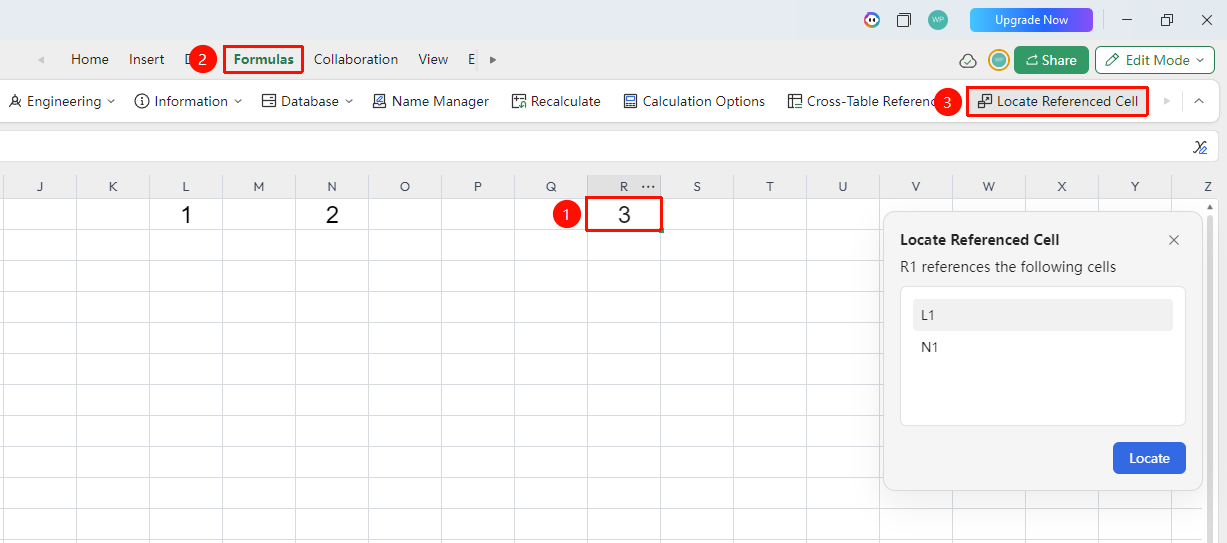
The Locate Referenced Cells feature is used to view which cells a given cell references, helping collaborative teams troubleshoot formula errors and understand data relationships.
Feature Description
| Feature Dimension | Description |
|---|---|
| Membership Restriction | No membership restriction |
| Version Restriction | No version restriction |
Operation Steps
Locate Referenced Cells
Feature Entry
"Formulas" tab → "Locate Referenced Cells" button
- Select the cell whose reference relationships you want to view
- Click the "Locate Referenced Cells" button in the Formulas tab
- The pop-up window will display the cells referenced by the selected cell
- Click "Locate" to automatically trace the source of this data