Feature Summary
Format Painter can quickly copy the font, color, border, fill, and other formatting of a cell and apply it to other cells with one click, greatly improving the efficiency of unifying spreadsheet formatting.
Feature Description
| Feature Dimension | Description |
|---|---|
| Membership Restriction | No membership restriction |
| Version Restriction | No version restriction |
Steps
Using Format Painter Once
Feature Entry
"Home" tab → "Format Painter"
- Select the cell or range that has been set with the target formatting
- Click the "Format Painter" button (brush-shaped icon) in the "Home" tab
- The cursor will change to a brush style; drag to select the target range where you want to apply the formatting
- After releasing the mouse, the formatting is automatically applied to the target range, and the feature automatically exits after a single use
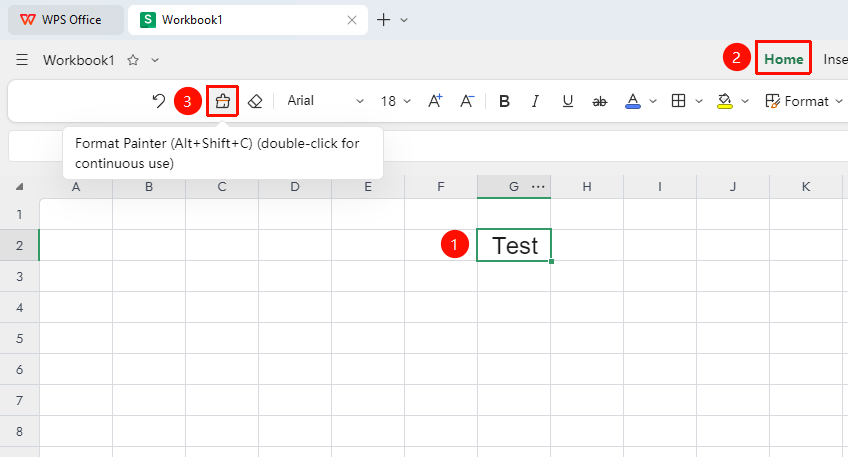
Using Format Painter Multiple Times in Succession
Feature Entry
"Home" tab → "Format Painter"
- Select the cell or range that has been set with the target formatting
- Double-click the "Format Painter" button to lock the feature and enter continuous mode
- Brush-select all target ranges where you need to apply the formatting one by one
- After finishing all, press the
ESCkey or click the Format Painter icon again to exit continuous mode
FAQ
Q1: The Format Painter button is grayed out and unavailable
- Solution: The current account only has view permission. You need to contact the document owner to request edit permission before you can use the Format Painter feature.
Q2: Can Format Painter copy conditional formatting
- Solution: Format Painter can copy the basic formatting of a cell (font, color, border, fill, and so on), but cannot copy conditional formatting rules. If you need to copy conditional formatting, you must set it up again in the target range.
Notes
- Format Painter only copies formatting, not cell content or formulas
- After double-clicking Format Painter to enter continuous mode, be sure to press ESC to exit, otherwise it will affect other operations
- When using Format Painter across worksheets, click Format Painter and then switch to the target worksheet to apply it