Feature Summary
WPS Sheets supports inserting combo charts in collaboration mode, combining two or more different chart types (such as column charts and line charts) into a single chart to comprehensively present the relationships between different data series.
Feature Description
| Feature Dimension | Description |
|---|---|
| Membership Restrictions | No version restrictions |
| Version Restrictions | No version restrictions |
Operation Steps
Inserting a Combo Chart
Feature Entry
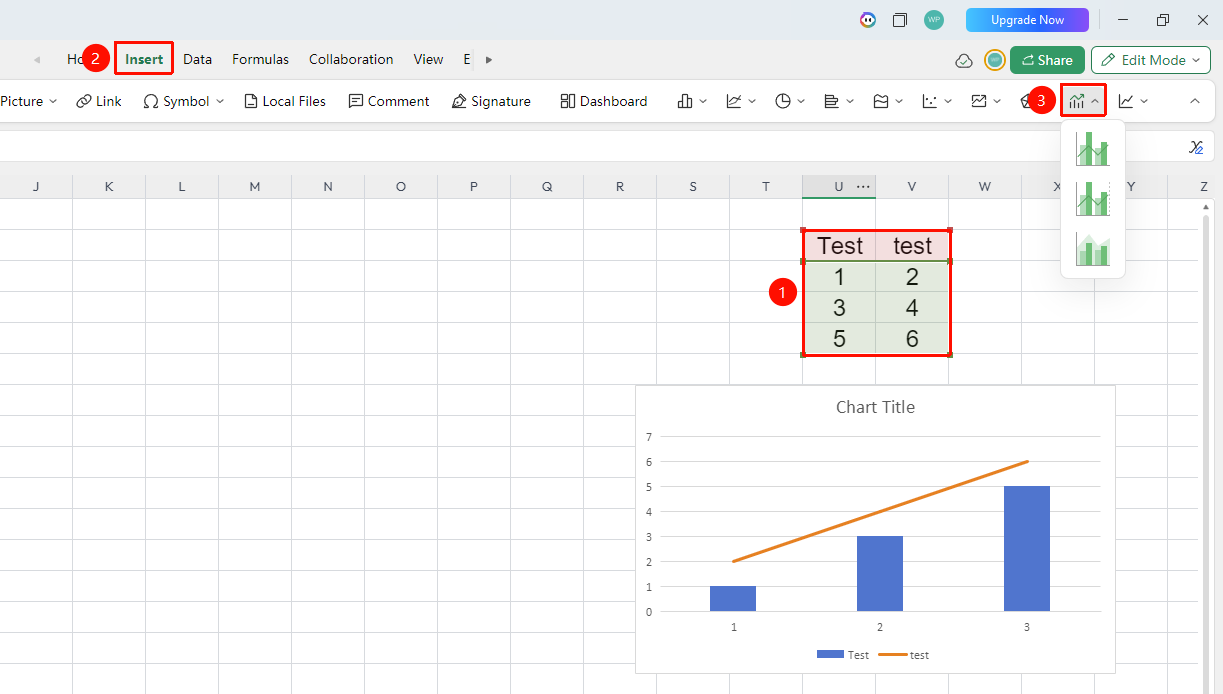
"Insert" tab → "Chart" → "Combo Chart"
- Select the cell range containing data (ensure category headers and values are included)
- Click the "Insert" tab, select "Combo Chart"
- Then select a specific subtype (Column + Line, Column + Line Dual-Axis, and so on.)
- The system will intelligently recognize the data and generate a combo chart
FAQ
Q1: What scenarios are combo charts suitable for?
- Solution: Combo charts are suitable for simultaneously displaying quantities that need comparison and quantities that need to reflect trends, such as sales revenue (column chart) + year-over-year growth rate (line chart), output (column chart) + gross margin (line chart), and other multi-dimensional comprehensive analyses.
Notes
- Combo charts are suitable for comparing data of different dimensions or units in the same chart
- When enabling dual axes, clearly distinguish the series corresponding to the primary and secondary axes
- Legend labels should be clear and distinct to prevent readers from confusing the chart types of each series