Feature Summary
The Duplicate Items feature is used to quickly find and mark duplicate data rows in collaborative spreadsheets, helping team members efficiently clean and verify data to ensure the accuracy of collaborative document data.
Feature Description
| Feature Dimension | Description |
|---|---|
| Membership Restriction | No membership restriction |
| Version Restriction | No version restriction |
Operation Steps
Highlight Duplicates
Feature Entry
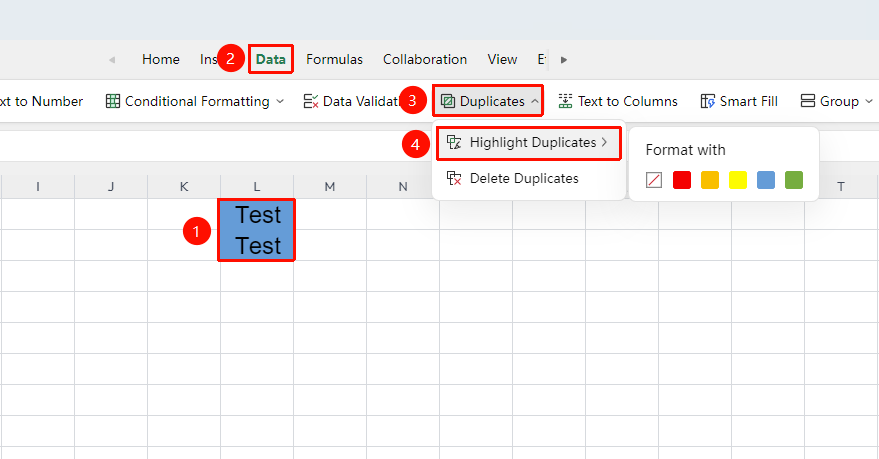
"Data" tab → "Duplicate Items" button → "Highlight Duplicates"
- Select the cell range to check for duplicates
- Click the "Duplicate Items" button in the Data tab
- Select "Highlight Duplicates"
- Specify a color in the pop-up dialog box
- Cells containing duplicate data will be filled with the marked color
Remove Duplicates
Feature Entry
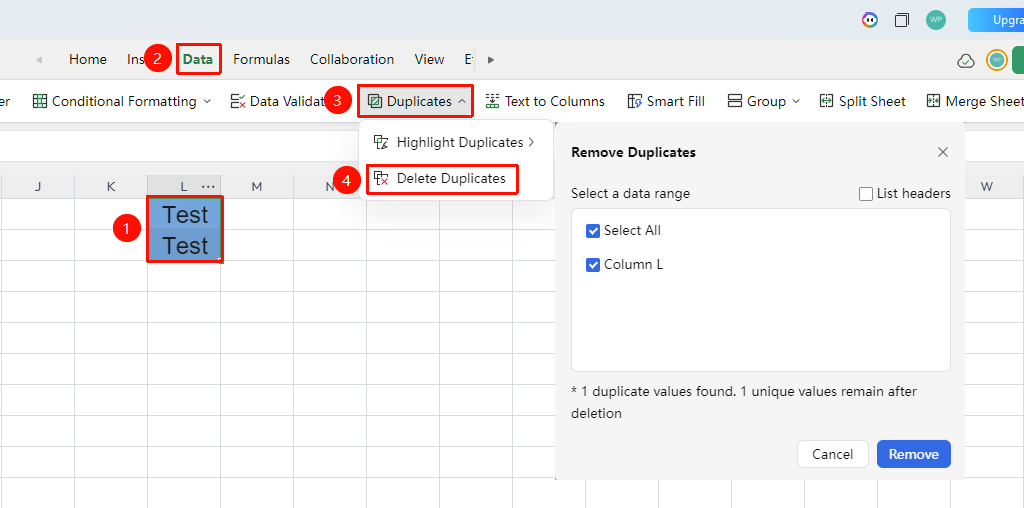
"Data" tab → "Duplicate Items" button → "Remove Duplicates"
- Select the data range containing duplicate data (including headers)
- Click "Duplicate Items" → "Remove Duplicates"
- In the pop-up dialog box, select the columns to determine duplicates
- Click OK, the system will keep the first unique record and delete subsequent duplicate rows
- A pop-up will indicate the number of duplicate data records deleted
FAQ
Q1: Can I undo after removing duplicates?
- Solution: You can immediately undo the operation by pressing Ctrl+Z to restore data. However, it is recommended to back up data before performing the deletion, as subsequent operations will increase the number of undo steps.
Q2: How to remove duplicates based on only some columns?
- Solution: After opening the "Remove Duplicates" dialog box, uncheck the columns that should not be used for judgment, keeping only the key columns needed to determine duplicates, then click OK to delete duplicate data based on the specified columns.
Notes
- Duplicate detection is an exact match; content is determined as duplicate only if it is completely identical
- Removing duplicates/undoing duplicate removal may take some time if multiple cells are involved, please wait patiently