Feature Summary
WPS Sheets supports inserting radar charts in collaboration mode, displaying multi-dimensional data in the form of a network diagram to help quickly analyze the comparative status of various indicators within the whole, facilitating multi-dimensional comprehensive evaluation.
Feature Description
| Feature Dimension | Description |
|---|---|
| Membership Restriction | No membership restriction |
| Version Restriction | No version restriction |
Operation Steps
Inserting a Radar Chart
Feature Entry
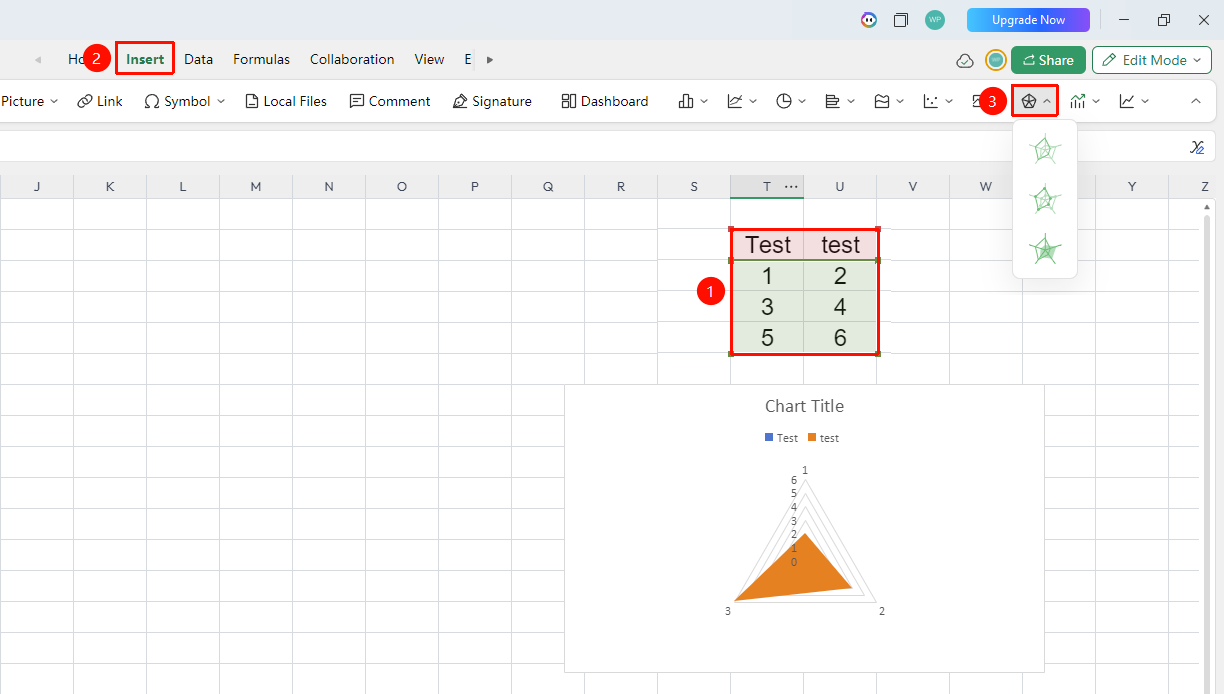
"Insert" tab → "Chart" → "Radar Chart"
- Select the cell range containing data (ensure category headers and values are included)
- Click the "Insert" tab, select "Radar Chart"
- Then choose a specific sub-type (Radar Chart, Radar Chart with Data Markers, and so on.)
- The chart will be generated automatically; you can drag to adjust its position and size
Frequently Asked Questions
Question 1: What analysis scenarios are radar charts suitable for?
- Solution: Radar charts are commonly used for multi-dimensional comprehensive comparative analysis, such as employee competency assessment (communication, leadership, technical skills, and other dimensions), multi-attribute product comparison, comprehensive financial indicator analysis, and other scenarios requiring simultaneous consideration of multiple indicators.
Question 2: What does a larger polygon in a radar chart represent?
- Solution: A larger polygon area indicates better overall performance of that data series across all dimensions; a polygon skewed in a certain direction indicates a higher data value in that dimension.
Question 3: Is there a limit to the number of dimensions in a radar chart?
- Solution: It is recommended to keep the number of dimensions within 6-8; too many dimensions will make the chart overly complex and difficult to read. The value ranges across dimensions should be unified as much as possible, otherwise the comparison effect will be affected.
Notes
- Radar charts are suitable for comparing the comprehensive performance of multiple objects across multiple dimensions
- The units and value ranges of each dimension should be unified as much as possible, otherwise the chart will be distorted
- Modifications in collaboration mode are visible to all collaborators in real time
- For multi-series radar charts, it is recommended to use semi-transparent color fills to avoid mutual occlusion