Feature Summary
The Move or Copy Sheet feature is used to adjust the position of a sheet within a workbook, or to copy a sheet to another workbook.
Feature Description
| Feature Dimension | Description |
|---|---|
| Membership Restriction | No membership restriction |
| Version Restriction | No version restriction |
Operation Steps
Move or Copy Sheet via Right-Click Menu
Feature Entry
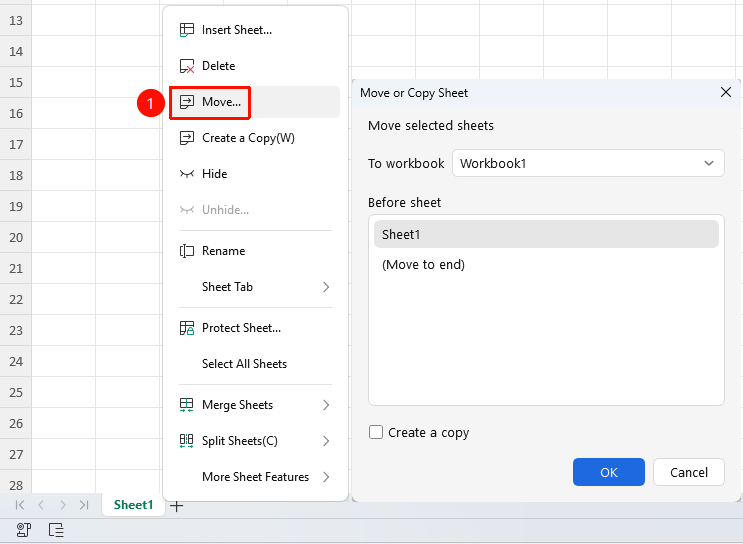
Right-click sheet tab → "Move" button
- Right-click the sheet tab you want to move
- Select the "Move" button
- Choose the target location and click the OK button
Move or Copy Sheet via Ribbon
Feature Entry
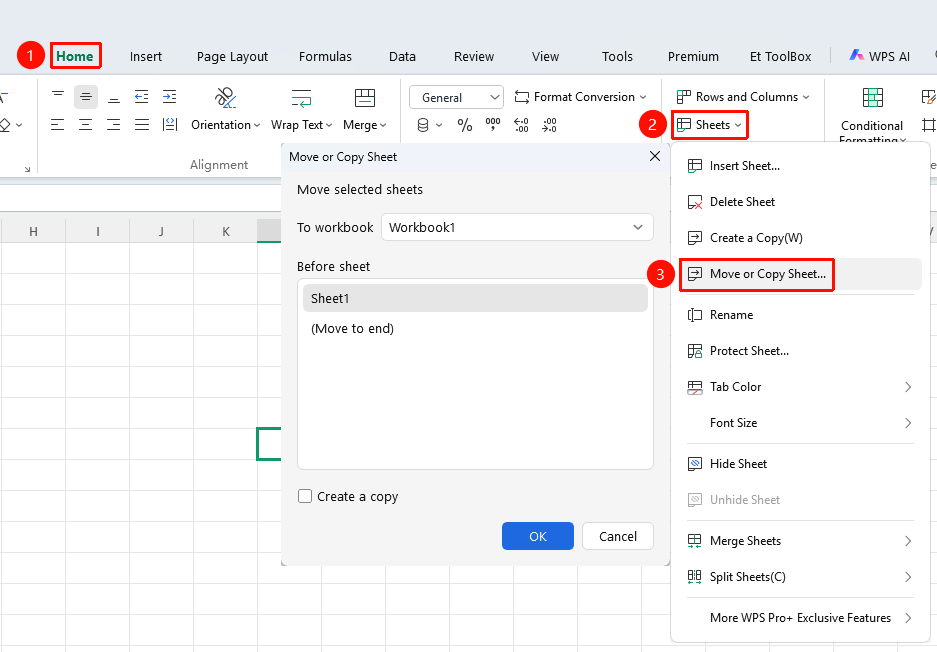
"Home" tab → "Sheet" dropdown menu → "Move or Copy Sheet" button
- Click the Home tab
- Select the Sheet dropdown menu
- Click the "Move or Copy Sheet" button
- Choose the target location and click the OK button
Frequently Asked Questions
Question 1: How to copy a sheet to another workbook?
- Solution: In the "Move or Copy" dialog box, select the target workbook from the "Move selected sheets to workbook" dropdown list.
Notes
- Drag the tab to quickly move a sheet
- Hold Ctrl and drag to quickly copy a sheet
- Copied sheets are automatically named (e.g., Sheet1 (2))