Feature Summary
The Camera function is used to create a dynamic image of a selected area. The image content updates automatically as the source data changes, making it easy to display data snapshots in other locations.
Feature Description
| Feature Dimension | Description |
|---|---|
| Membership Restriction | No membership restriction |
| Version Restriction | No version restriction |
Operation Steps
Using the Camera Function
Function Entry
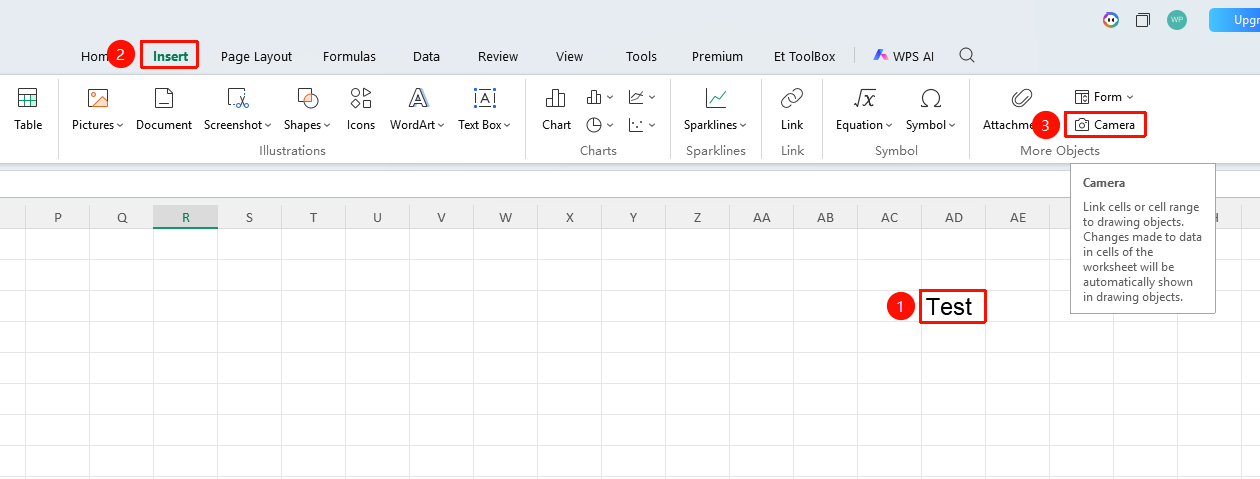
"Insert" tab → "Camera" button
- Select the cell range you want to capture
- Click the Camera button in the Insert tab
- Click or drag at the target location to draw the image
- The generated image will display the content of the source area
Frequently Asked Questions
Question 1: Will the image generated by the Camera update?
- Solution: Yes. The Camera generates a dynamically linked image, which will update automatically when the source data changes.
Notes
- The Camera generates a dynamic image that updates with the source data
- The image can be copied to other worksheets or documents
- Suitable for creating data dashboards