Feature Summary
Form controls are used to add form elements such as buttons, checkboxes, drop-down lists, etc., to a worksheet for creating interactive forms and data entry interfaces.
Feature Description
| Feature Dimension | Description |
|---|---|
| Membership Restrictions | No membership restrictions |
| Version Restrictions | No version restrictions |
Operation Steps
Insert Form Controls
Feature Entry
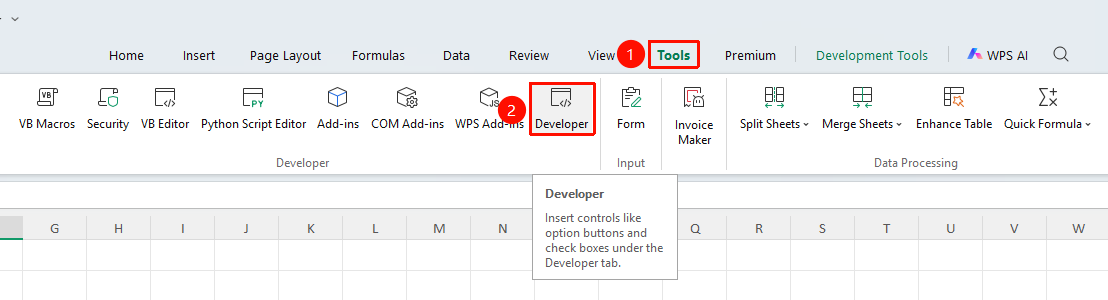
"Tools" tab → "Developer Tools" option → "Developer Tools" tab
- Click the "Developer Tools" button in the Tools tab to open the Developer Tools tab
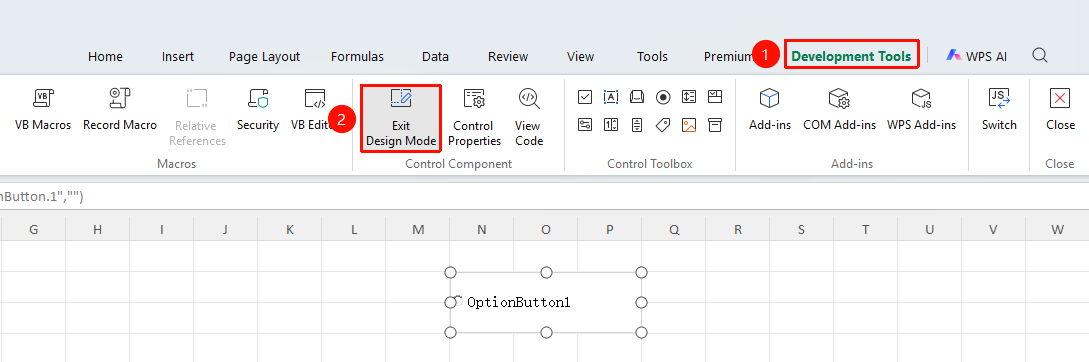
- Select the desired control in the "Control Toolbox" area:
- Button
- Checkbox
- Option Button
- List Box
- Combo Box
- Scroll Bar
- Other Controls
3.Drag to draw the control on the worksheet
Notes
- Form controls require macros to be enabled to function properly
- Controls can be linked to cells to retrieve values
- Suitable for creating data entry forms