Feature Summary
The attachment feature is used to insert file attachments into cells, supporting various file formats and making it easy to manage and view related documents within the spreadsheet.
Feature Description
| Feature Dimension | Description |
|---|---|
| Membership Restriction | No membership restriction |
| Version Restriction | No version restriction |
Operation Steps
Insert Attachment
Feature Entry
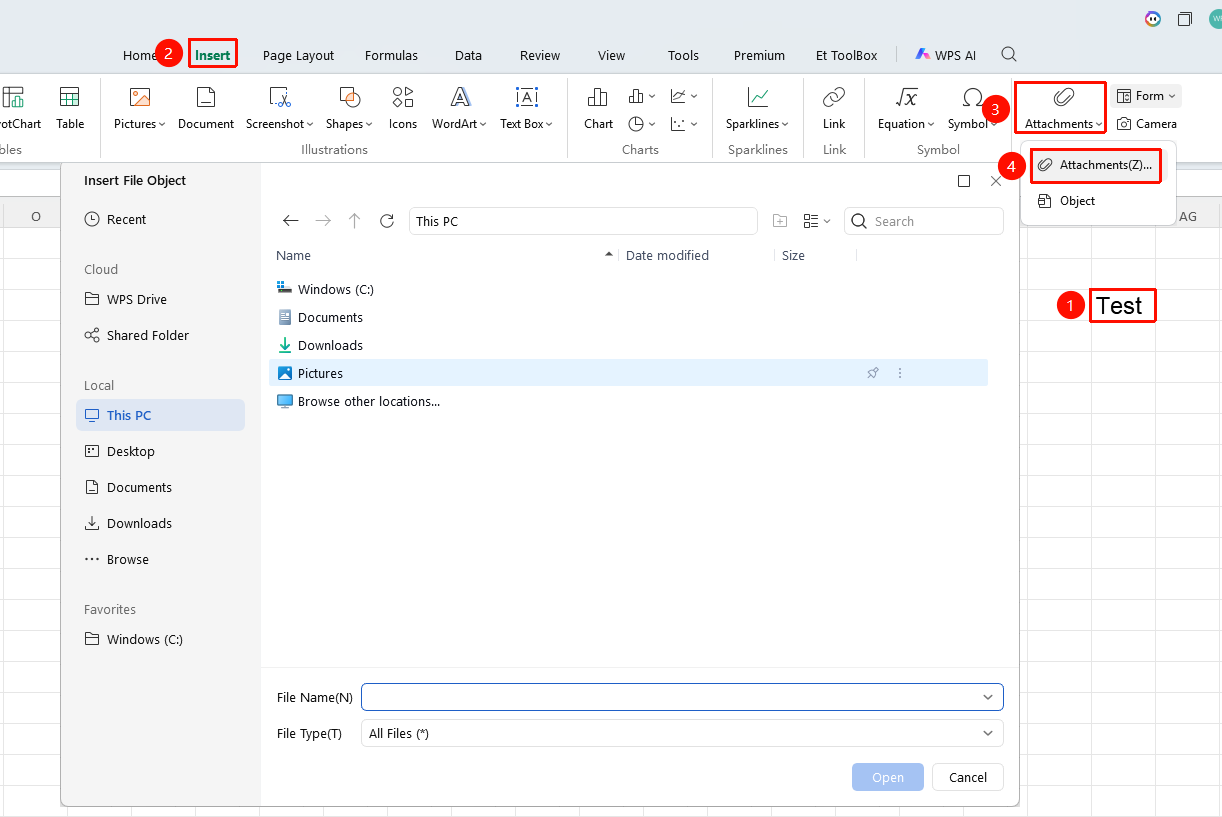
"Insert" tab → "Attachment" button
- Select the cell where you want to insert the attachment
- Click the Attachment button in the Insert tab
- Select the file you want to insert
- Click Open to complete the insertion
FAQ
Q1: Will attachments increase the file size?
- Solution: Yes. Attachment files are embedded into the workbook, which increases the file size.
Notes
- Attachments are embedded into the workbook
- A large number of attachments will significantly increase the file size
- Attachments can be extracted and saved locally