Feature Summary
Formula Evaluation allows you to view the calculation process of a formula step by step, helping users locate errors in complex formulas and analyze the calculation logic progressively.
Feature Description
| Feature Dimension | Description |
|---|---|
| Membership Restriction | No membership restriction |
| Version Restriction | No version restriction |
Steps
Using Formula Evaluation
Feature Entry
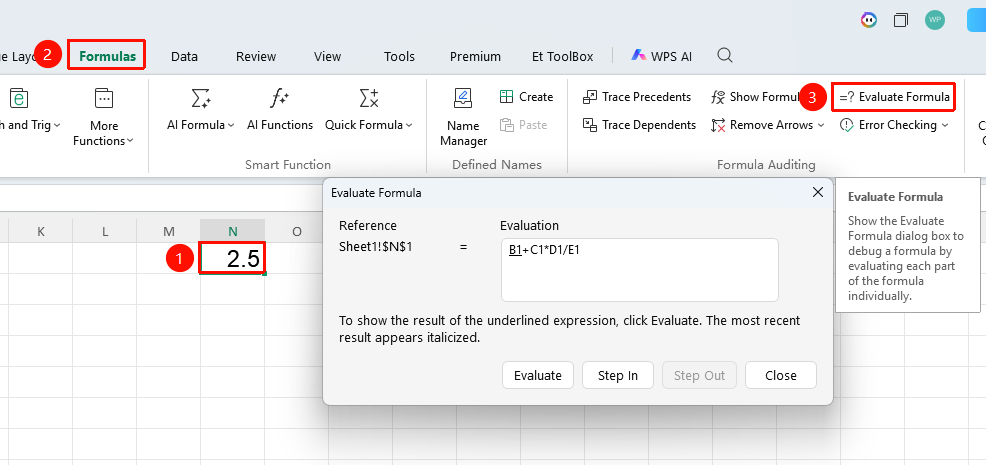
"Formulas" tab → "Evaluate Formula" button
- Select the cell containing the formula
- Click the Evaluate Formula button in the Formulas tab
- In the pop-up window, view the current formula content. The underlined part is the parameter currently pending evaluation.
- Click Step In: View the content of the referenced cell corresponding to the underlined parameter.
- Click Evaluate: Calculate the formula step by step. Each click performs one step of the calculation.
- Click Step Out: Return from the internal reference of a nested formula to the outer formula, making it easier to view the overall calculation flow of the current formula.
- Repeat clicking until the final result is obtained. After locating the error, close the window to modify the formula.
FAQ
Q1: What is the difference between "Step In" and "Evaluate"?
- Solution: "Step In" is used to view the actual value of the referenced cell, while "Evaluate" is used to execute the calculation of the current step. Generally, it is recommended to first step in to confirm the reference is correct, then evaluate to proceed to the next step.
Q2: What should I do if the content in the Formula Evaluation window is truncated?
- Solution: You can drag the border of the pop-up window to enlarge it and view the complete formula content.
Q3: Does Formula Evaluation support nested functions?
- Solution: Yes. Complex nested formulas are expanded and calculated layer by layer from the inside out, with each step showing the current calculation progress.
Notes
- Before use, you must first select a cell containing a formula; otherwise, the button will be grayed out and unavailable.
- Applicable only to regular formulas; array formulas are handled slightly differently.