Feature Summary
The Insert Table feature is used to create data tables in a worksheet. It can quickly generate a table with a specified number of rows and columns, supporting data entry, calculation, and analysis. It is a core feature of WPS Sheets.
Feature Description
| Feature Dimension | Description |
|---|---|
| Membership Restriction | No membership restriction |
| Version Restriction | No version restriction |
Operation Steps
Quick Table Insertion
Feature Entry
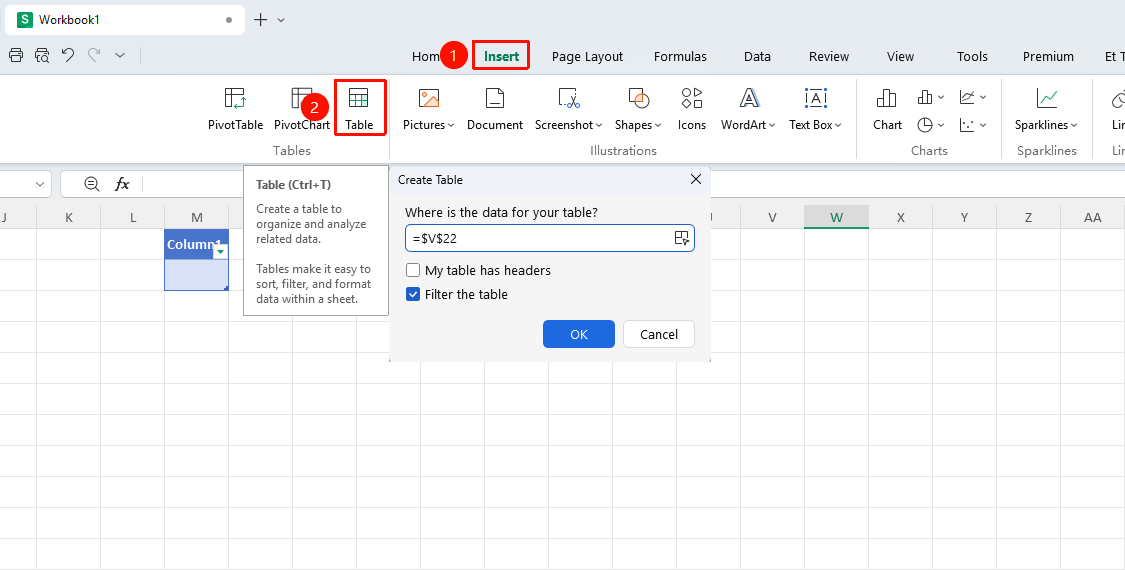
"Insert" tab → "Table" option
- Click the "Table" button in the Insert tab
- Select the data range in the dialog box
- Click OK to complete the insertion
Shortcut:
Ctrl+T
Frequently Asked Questions
Q1: What is the difference between a table and a normal cell range?
- Solution: Tables have enhanced features such as auto-expansion, filtering, styles, and structured references, which normal ranges do not have.
Q2: How to convert existing data into a table?
- Solution: After selecting the data range, press
Ctrl+Tor click "Insert" → "Table" to quickly convert it.
Notes
- Tables support auto-expansion; newly added data will be automatically included in the table
- Tables provide convenient features such as filtering, sorting, and styles
- Tables can be converted back to a normal range