Feature Summary
The Paper Size feature is used to set the paper dimensions for printing, supporting common sizes such as A4, A3, and Letter.
Feature Description
| Feature Dimension | Description |
|---|---|
| Membership Restriction | No membership restriction |
| Version Restriction | No version restriction |
Operation Steps
Selecting Paper Size
Feature Entry
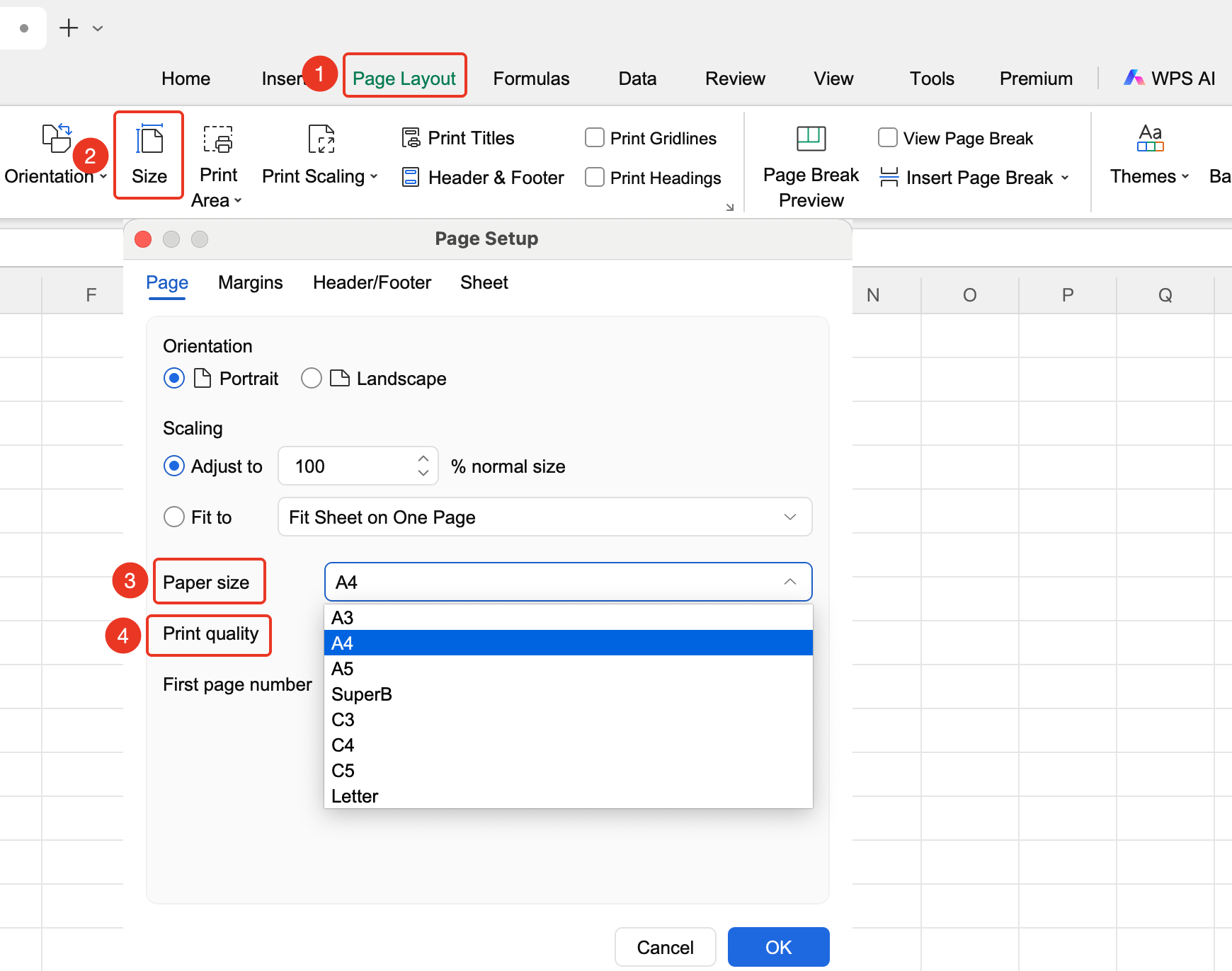
"Page" tab → "Paper Size"
- Click the Page Layout tab
- Click the Paper Size button
- View preset paper sizes and change to the desired "Quality"
- Click OK to apply
FAQ
Q1: What should I do if I cannot find the paper size I need?
- Solution: Custom paper sizes require a corresponding printer and driver support. You can switch to the "WPS PDF" driver to view more paper size options.
Q2: What should I do if the print result is incorrect after setting the paper size?
- Solution: Confirm that the printer supports the selected paper size and select the corresponding paper in the printer properties.
Notes
- Paper size affects pagination
- Different printers may support different paper sizes