Feature Summary
The transition effect feature is used to set transition animation effects between slides, offering a variety of preset animations to make presentations smoother and more professional.
Feature Description
| Feature Dimension | Description |
|---|---|
| Membership Restriction | No membership restriction |
| Version Restriction | No version restriction |
Steps
Setting Transition Effects
Feature Entry
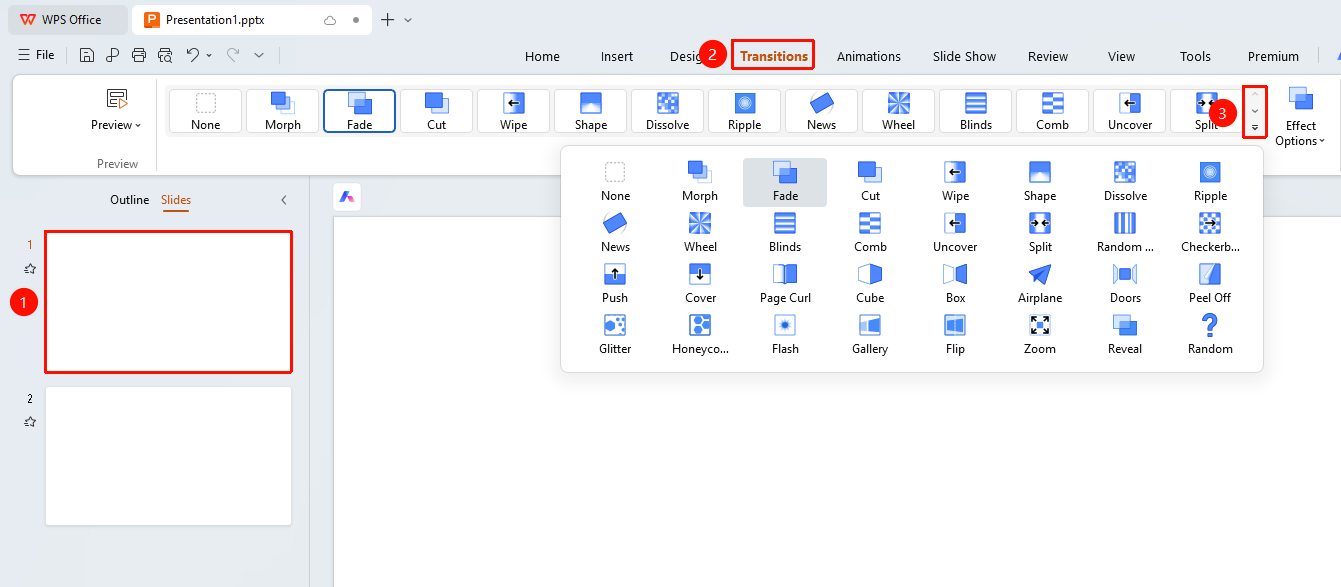
"Transitions" tab → Transition effect gallery drop-down button
- Select the slide you want to apply a transition effect to
- Click the "Transitions" tab at the top
- Click the transition effect gallery drop-down button to expand the full list of effects
- Choose the desired transition effect
- Click to apply the transition effect
FAQ
Q1: How to set the same transition effect for all slides
- Solution: After selecting a slide and setting a transition effect, click the "Apply to All" button under the "Transitions" tab to apply it to all slides.
Notes
- Different transition effects can affect file size