Feature Summary
The transition speed feature is used to set the playback speed of slide transition animations, allowing you to control the pace of transition effects.
Feature Description
| Feature Dimension | Description |
|---|---|
| Membership Restriction | No membership restriction |
| Version Restriction | No version restriction |
Steps
Setting Transition Speed
Feature Entry
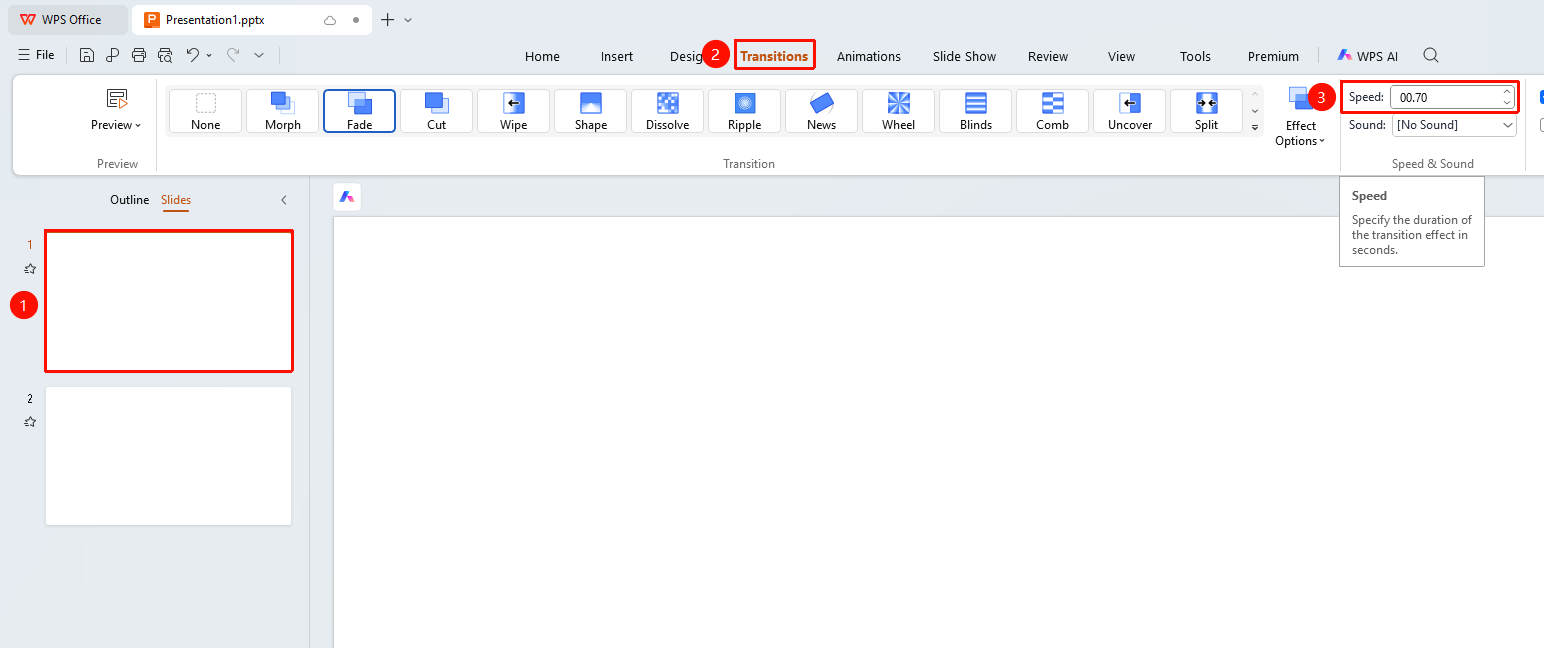
"Transitions" tab → "Speed" input box
- Select the slide for which you want to set the transition speed
- Click the "Transitions" tab at the top
- Enter the transition animation duration in the "Speed" input box
- You can also click the up arrow or down arrow to adjust the duration
FAQ
Q1: How to make the transition effect faster
- Solution: Set the "Duration" to a shorter value, such as 0.5 seconds.
Notes
- Transition speed affects the animation playback duration
- It is recommended to keep the transition speed between 0.5–2 seconds for the best effect