Feature Summary
Text properties are used to set how animations play for objects that contain text.
Feature Description
| Feature Dimension | Description |
|---|---|
| Membership Restriction | No membership restriction |
| Version Restriction | No version restriction |
Steps
Open Text Properties
Feature Entry
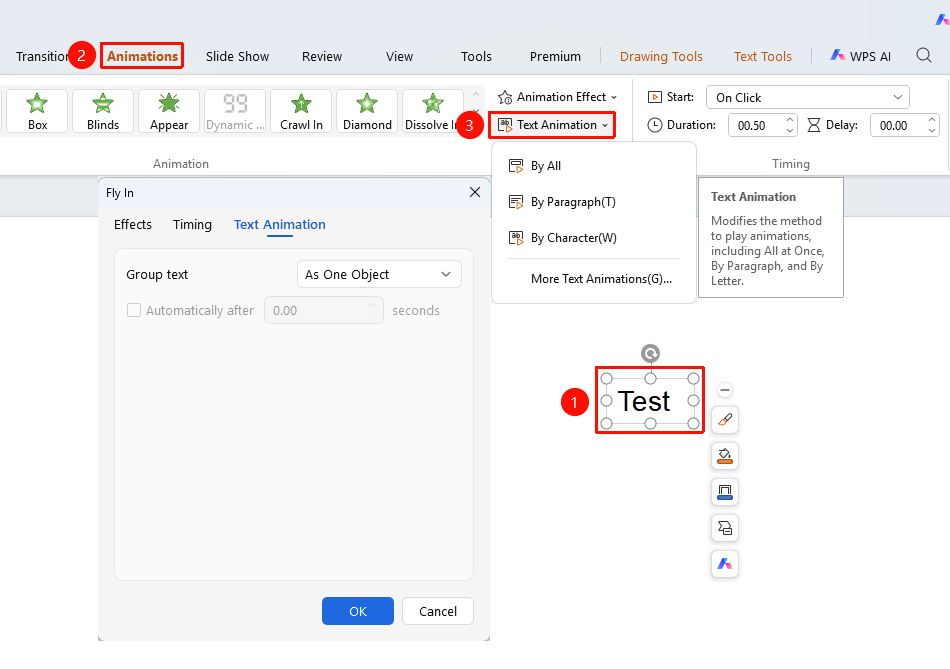
"Animations" tab → "Text Properties"
- Select an object that has an animation added and contains text
- Click the top "Animations" tab
- Click the "Text Properties" button
- Choose the desired text animation playback method
- "Play All" : Play the animation with the text as a whole object
- "Play by Paragraph" : Play the text animation paragraph by paragraph
- "Play Character by Character" : Play the text animation character by character
- "More Text Animations" : Expand the animation effect settings page
FAQ
Q1: What is the difference between text properties and animation properties?
- Solution: Animation properties set parameters such as the direction of the animation effect, while text properties set the text playback method (whole/paragraph/character by character).
Q2: How to make text appear character by character?
- Solution: Select the text object, click "Text Properties" → "Play Character by Character", and the text will appear character by character.
Notes
- Text properties are only effective for objects that contain text
- Different text playback methods can be combined with different animation effects