Feature Summary
WPS Slides supports Quick Layout, allowing you to adjust the arrangement of chart elements with one click.
Feature Description
| Feature Dimension | Description |
|---|---|
| Membership Restriction | No membership restriction |
| Version Restriction | No version restriction |
Operation Steps
Quick Layout via the Ribbon
Feature Entry
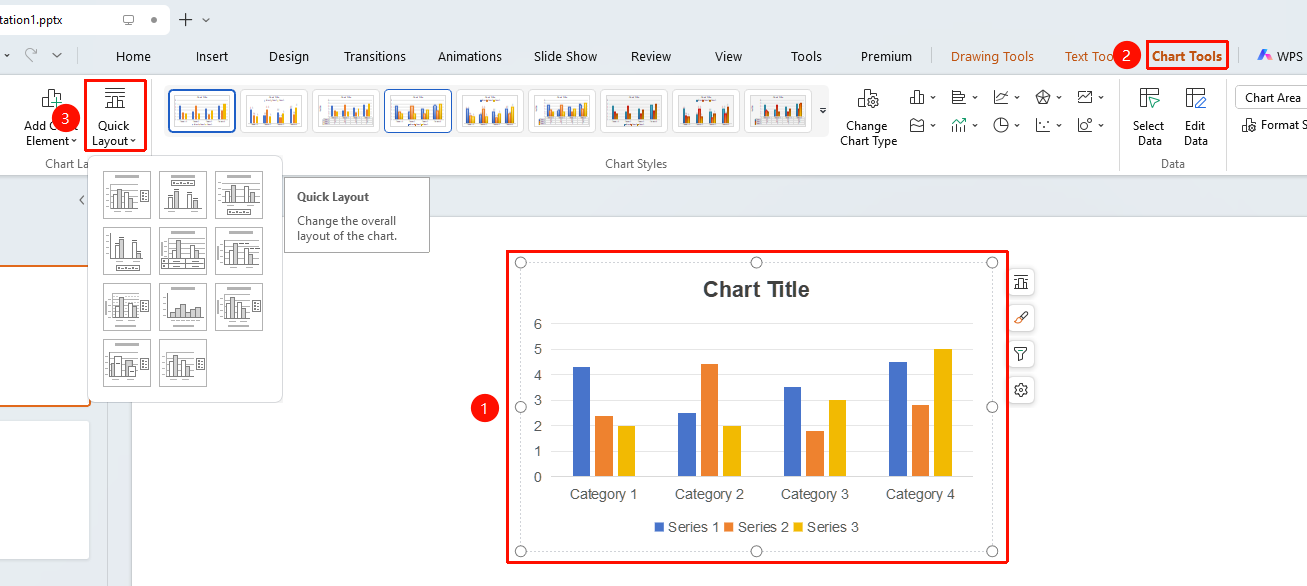
"Chart Tools" tab → "Quick Layout" button
- Click to select the chart
- Click the "Chart Tools" tab in the top menu bar
- Click the "Quick Layout" button
- Select a layout style from the drop-down panel
- Chart elements will be arranged according to the new layout
FAQ
Q1: Will Quick Layout affect the chart data?
- Solution: No, it will not affect the data. It only adjusts the positions of chart elements (title, legend, data labels, etc.).
Notes
- Quick Layout is a convenient way to beautify charts
- It is recommended to select a suitable layout before making detailed adjustments