Feature Summary
The Brightness Increase/Decrease feature is used to adjust the brightness of an image. Increasing brightness makes the image brighter overall, while decreasing brightness makes it darker overall.
Feature Description
| Feature Dimension | Description |
|---|---|
| Membership Restriction | No membership restriction |
| Version Restriction | No version restriction |
Operation Steps
Adjust Image Brightness
Feature Entry
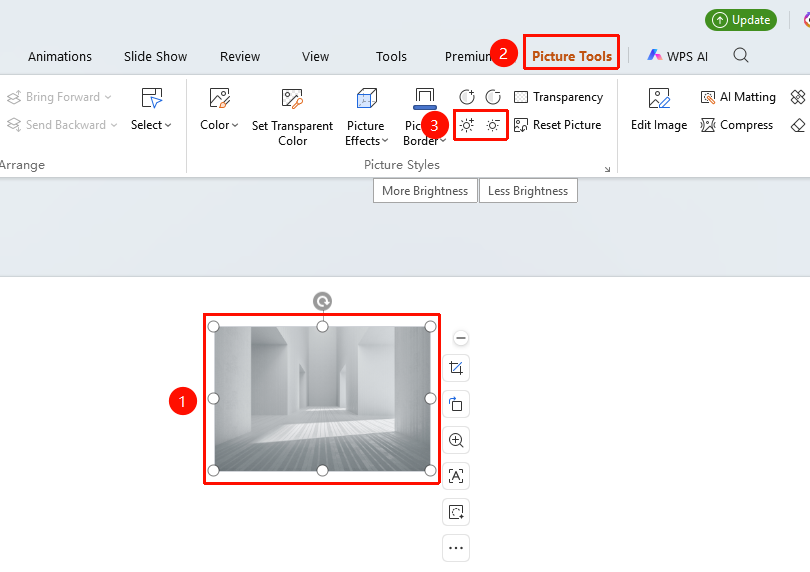
"Picture Tools" tab → "Increase Brightness" / "Decrease Brightness"
- Select the image whose brightness you want to adjust
- Click the "Picture Tools" tab
- Click the "Increase Brightness" button: to increase the image brightness
- Or click the "Decrease Brightness" button: to decrease the image brightness
FAQ
Q1: What is brightness?
- Solution: Brightness refers to the overall lightness or darkness of an image. High brightness makes the image brighter, and low brightness makes it darker.
Q2: How to restore after adjusting brightness?
- Solution: Use the "Picture Tools" tab → "Reset Style" to restore the image to its original state.
Notes
- Each click increases or decreases the brightness by a certain amount
- You can click multiple times to accumulate the effect
- Excessive brightness may cause the image to be overexposed or too dark