Feature Summary
WPS Slides local mode supports changing the chart type, converting the current chart into other chart types.
Feature Description
| Feature Dimension | Description |
|---|---|
| Membership Restriction | No membership restriction |
| Version Restriction | No version restriction |
Operation Steps
Change Type via the Ribbon
Feature Entry
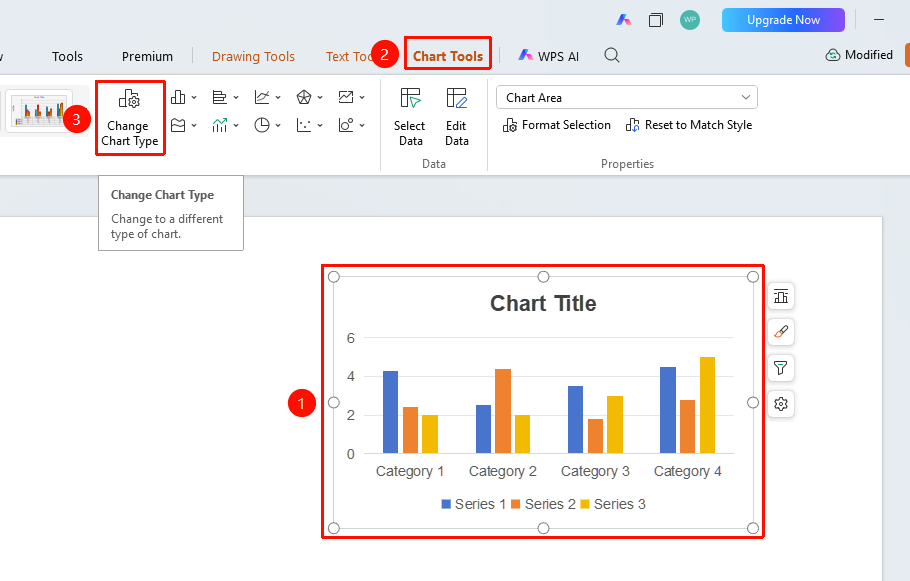
"Chart Tools" tab → "Change Type" button
- Click to select the chart
- Click the "Chart Tools" tab in the top menu bar
- Click the "Change Type" button
- Select a new chart type in the pop-up dialog box
- Click OK to complete the change
Change Type via the Right-Click Menu
Feature Entry
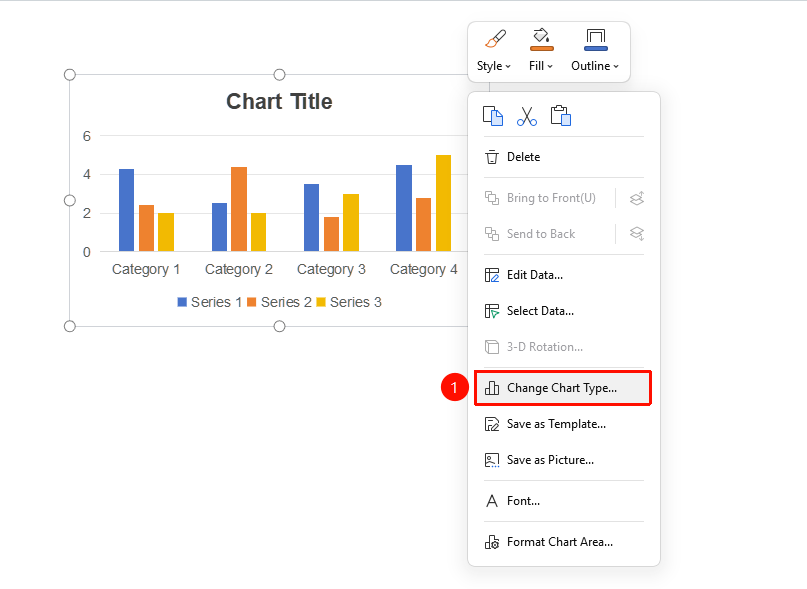
Chart → Right-click → "Change Chart Type"
- Right-click the chart
- Select the "Change Chart Type" option
- Select a new type in the dialog box
- Click OK
Frequently Asked Questions
Q1: Will data be lost when changing the chart type?
- Solution: Data will not be lost; only the visualization method of the data is changed.
Q2: Which chart types can be converted to each other?
- Solution: Common types such as column charts, line charts, pie charts, and bar charts can all be converted to each other.
Q3: Will formatting be retained after changing the type?
- Solution: Some formatting will be retained, but certain formatting specific to particular types may need to be reset.
Notes
- Consider data characteristics when selecting a chart type
- Pie charts are suitable for displaying proportions, while line charts are suitable for displaying trends