Feature Summary
WPS Slides local mode supports adding various elements to charts, including axes, titles, data labels, legends, etc.
Feature Description
| Feature Dimension | Description |
|---|---|
| Membership Restriction | No membership restriction |
| Version Restriction | No version restriction |
Operation Steps
Adding Elements via the Ribbon
Feature Entry
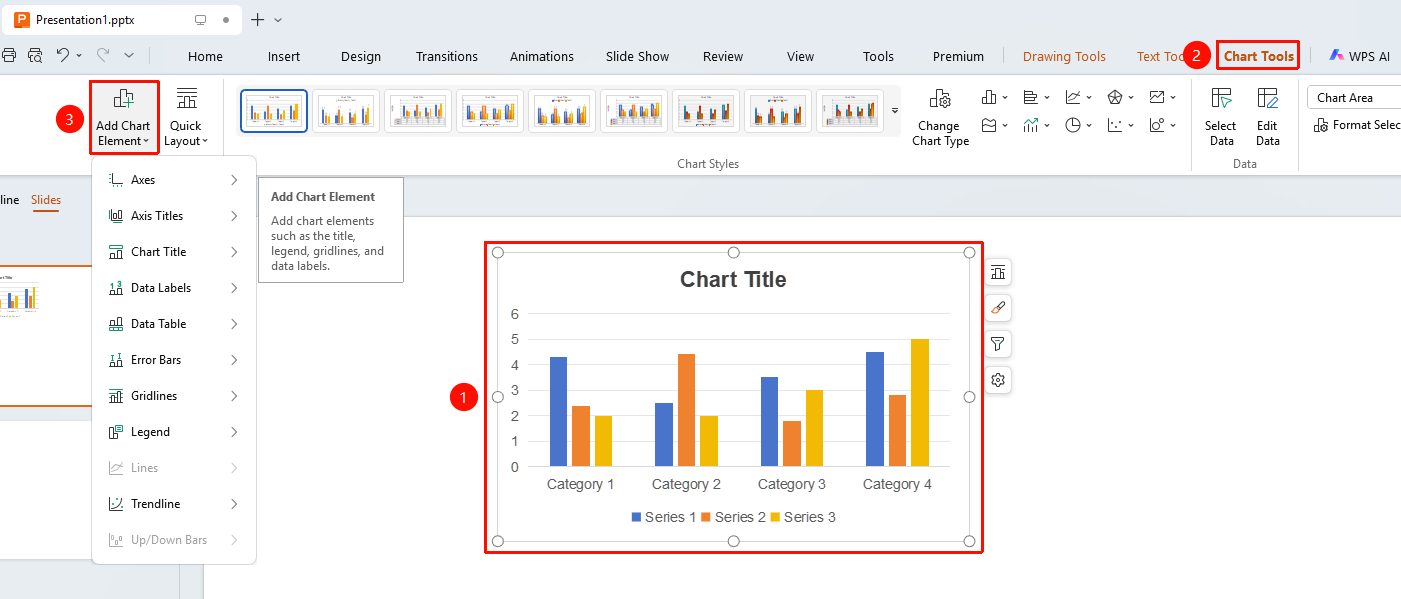
"Chart Tools" tab → "Add Element" button
- Click to select the chart
- Click the "Chart Tools" tab in the top menu bar
- Click the "Add Element" button
- Select the type of element to add:
- Axes (X): Add or hide axes
- Axis Titles (A): Add axis titles
- Chart Title (C): Add chart title
- Data Labels (D): Display data values
- Data Table (B): Display data table below the chart
- Error Bars (E): Add error bars
- Gridlines (G): Add gridlines
- Legend (L): Display legend
- Trendline (T): Add trendline
- Select a specific style to apply
FAQ
Notes
- Choose appropriate elements based on the chart type
- Avoid adding too many elements, which may clutter the chart