Feature Summary
The Table Effects feature is used to add shadow and reflection visual effects to tables, giving them a three-dimensional and layered appearance, thereby enhancing the professionalism and visual appeal of the presentation.
Feature Description
| Feature Dimension | Description |
|---|---|
| Membership Restriction | No membership restriction |
| Version Restriction | No version restriction |
Operation Steps
Apply Preset Table Effects
Feature Entry
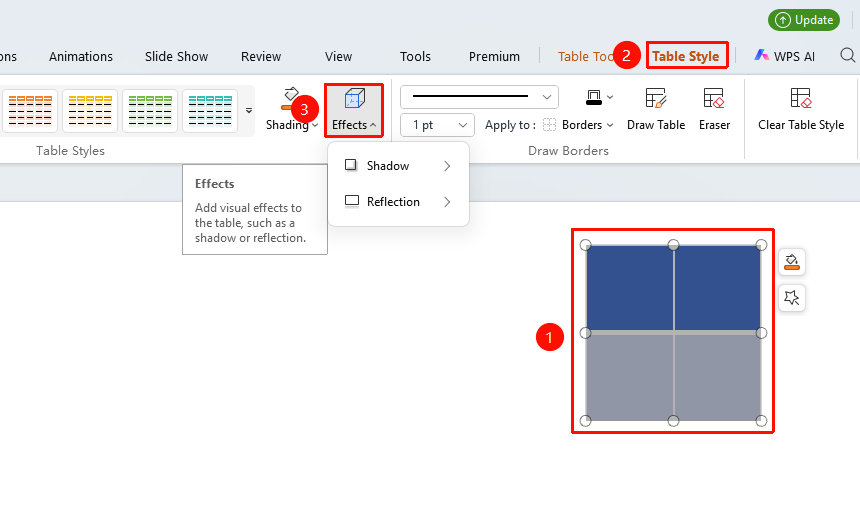
"Table Styles" tab → "Effects" option → "Shadow" / "Reflection"
- Position the cursor on the table you want to apply effects to and select the table.
- Click the "Effects" option in the "Table Tools" tab.
- Select "Shadow" / "Reflection" to expand the preset effects, and click the desired effect to apply it quickly.
Custom Table Effects
Feature Entry
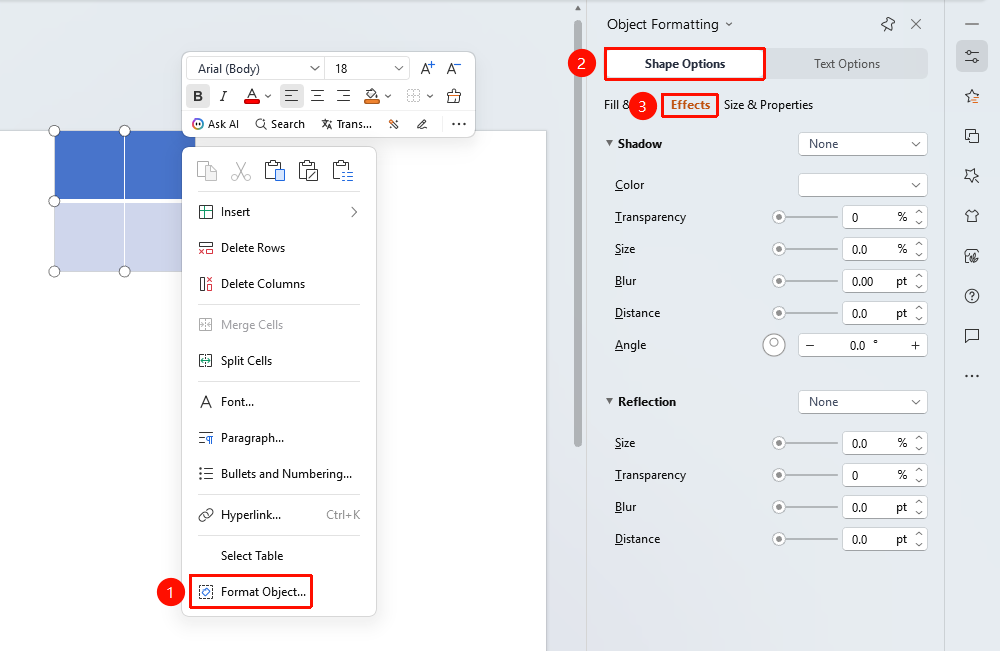
Table right-click menu → "Shape Options" → "Effects"
- Click any cell in the table to select it, then right-click to bring up the context menu.
- Click "Format Object" in the context menu to open the "Object Properties" sidebar panel.
- Switch to the "Shape Options" tab.
- In the "Effects" section, click "Shadow" or "Reflection" to expand the detailed settings menu.
- Set the desired parameters such as color, transparency, and size respectively, and preview the effect in real time.
FAQ
Q1: Will table effects affect the text inside the table?
- Solution: Effects such as shadow and reflection apply to the entire table object, including table borders and internal content. However, these effects will not affect text editing and formatting settings.
Q2: How to remove applied table effects?
- Solution: In the corresponding effect settings of the properties panel, select no-effect options such as "No Shadow" or "No Reflection" to remove them.
Q3: Will table effects display normally during a slideshow?
- Solution: Yes, the set table effects will display normally in slideshow mode. However, overly complex effects may affect slideshow performance.
Notes
- Table effects apply to the entire table object, not individual cells.
- Shadow and reflection effects can enhance the three-dimensionality of the table, making them suitable for displaying important data.