Feature Summary
The Pattern Fill feature adds regular geometric patterns (such as stripes, dot grids, meshes, etc.) to the interior of text strokes. By setting foreground and background colors, you can customize the pattern appearance, making it suitable for creating decorative special text effects.
Feature Description
| Feature Dimension | Description |
|---|---|
| Membership Restriction | No membership restriction |
| Version Restriction | No version restriction |
Operation Steps
Apply Preset Pattern Fill
Feature Entry
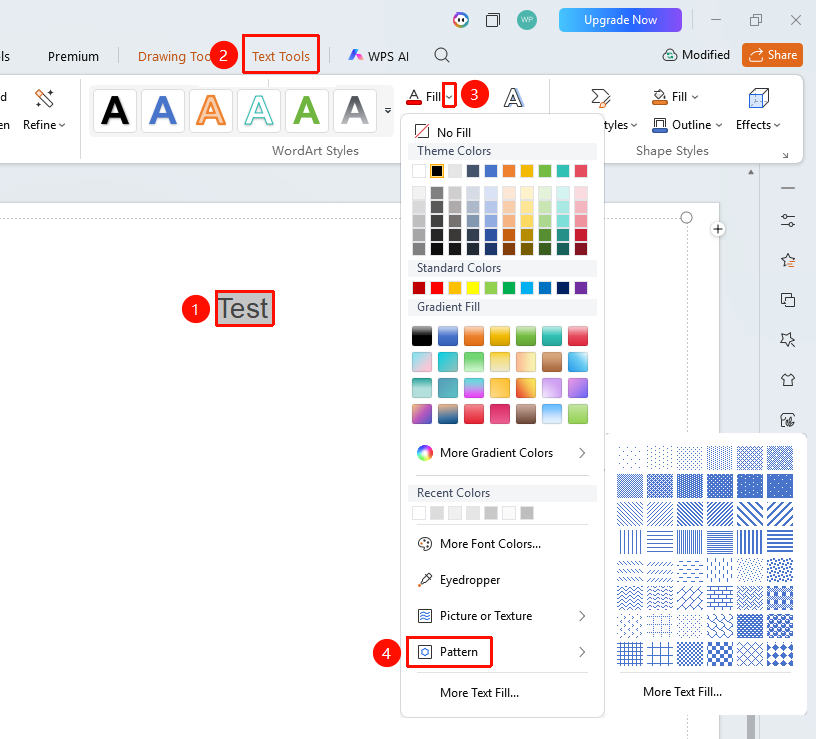
"Text Tools" tab → "Text Fill" → "Pattern"
- Select the text content to be filled
- Click "Text Effects" → "Text Fill" → "Pattern"
- Choose the desired pattern style from the pop-up pattern library
- The pattern fill effect will be applied to the text immediately after selection
Custom Pattern Fill Effect
Feature Entry
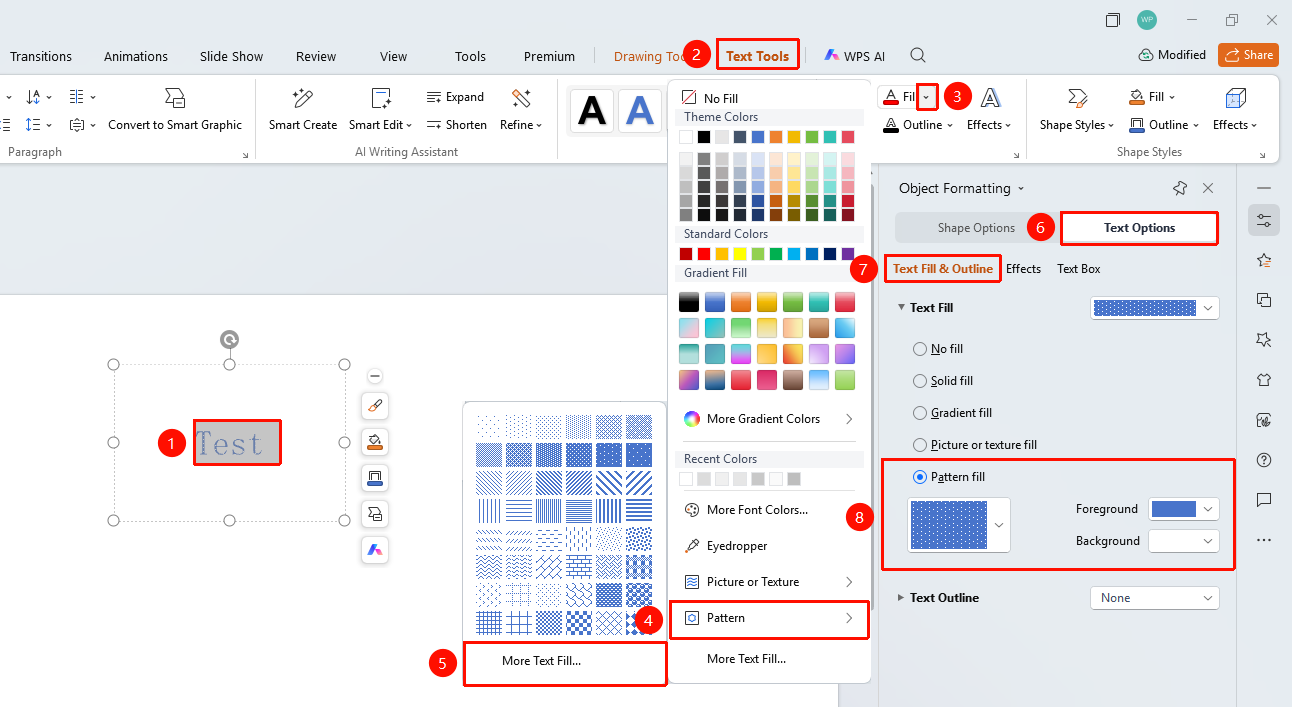
"Text Tools" tab → "Text Fill" → "Pattern" → "More Settings" → "Text Options" → "Fill & Outline" → "Pattern Fill"
- Select the target text, click the drop-down arrow to the right of "Text Fill" under the "Text Tools" tab
- Click "Pattern" → "More Settings" in sequence to expand the "Object Properties" right-side panel
- Click the "Fill & Outline" option under the "Text Options" tab
- Locate the "Text Fill" section
- Switch the fill effect to "Pattern Fill" to expand the detailed settings panel
- Select the desired fill foreground, background, and fill style display effects
- The text effect will be applied to the selected text in real time
FAQ
Q1: What optional styles are available for pattern fill
- Solution: WPS Slides provides a variety of pattern styles, including fine stripes, thick stripes, diagonal lines, reverse diagonal lines, grids, dot grids, diamonds, etc. Each pattern can have its visual effect changed by adjusting the foreground and background colors.
Q2: What scenarios are suitable for pattern fill
- Solution: Pattern fill is suitable for creating text with a retro style, industrial style, or special decorative effects. In presentations where a sense of texture or handcrafted feel needs to be highlighted, pattern fill can bring a unique visual experience.
Q3: How to adjust the density and size of the pattern
- Solution: The density and size of the pattern fill are usually determined by the preset style.
Notes
- Pattern fill is suitable for small-area decorative text; large-area use may affect readability
- The contrast between foreground and background colors determines the clarity of the pattern
- Pattern fill may appear blurry during projection due to insufficient resolution