Feature Summary
The text reflection effect generates a mirrored reflection below the text, simulating the reflective effect of a water surface or a smooth surface, giving the text a sense of transparency and depth. It is suitable for creating high-end, stylish title text.
Feature Description
| Feature Dimension | Description |
|---|---|
| Membership Restriction | No membership restriction |
| Version Restriction | No version restriction |
Operation Steps
Apply Preset Reflection
Feature Entry
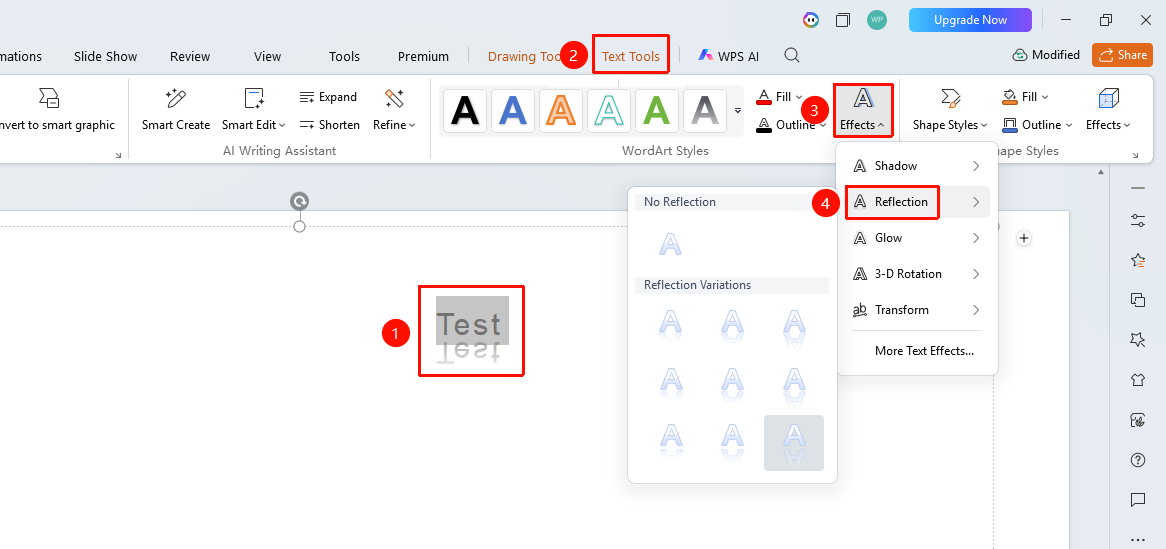
"Text Tools" tab → "Text Effects" → "Reflection"
- Select the text content to which you want to add a reflection
- Under the top "Text Tools" tab, click "Text Effects" → "Reflection"
- In the pop-up panel, select a preset reflection style (different reflection sizes and distances)
- The corresponding reflection effect will appear below the text
Custom Reflection Parameters
Feature Entry
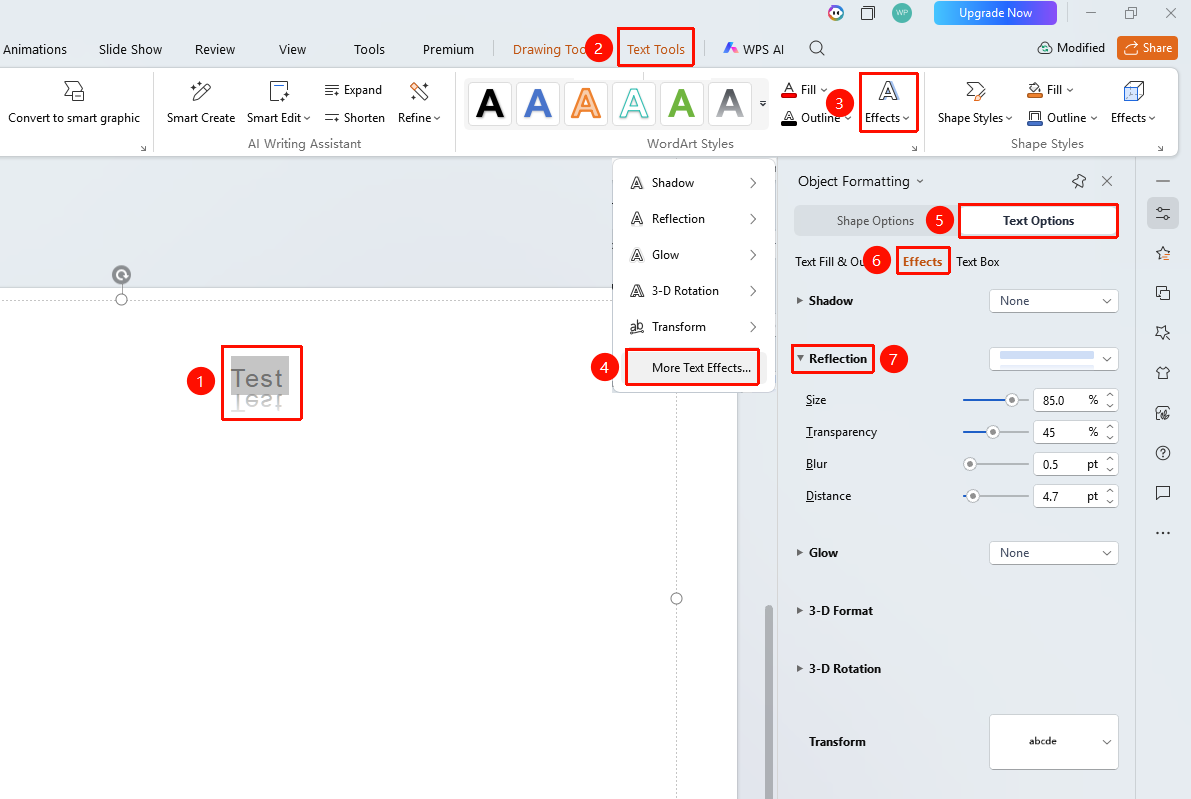
"Text Tools" tab → "Text Effects" → "More Settings" → "Text Options" → "Effects" → "Reflection"
- Select the target text, click "Text Effects" under the "Text Tools" tab
- Click → "More Settings" option to expand the "Object Properties" right-side panel
- Click the "Effects" option under the "Text Options" tab
- Click "Reflection" to open the detailed settings panel
- Adjust the Transparency of the reflection to control its visibility
- Adjust the Size to control the display scale of the reflection
- Adjust the Distance to control the spacing between the reflection and the original text
- Adjust the Blur to control the sharpness of the reflection
- Preview the setting effects in real time
FAQ
Q1: In which scenarios is the reflection effect most suitable?
- Solution: The reflection effect is suitable for product names, brand slogans, chapter titles, and other text that needs to create a sense of luxury and depth. Using the reflection effect on a dark background or gradient background is more appropriate.
Q2: How to make the reflection more natural?
- Solution: Set the Transparency of the reflection to 50%-70%, the Size to 40%-60%, and appropriately increase the Blur value. Avoid using a 100% size reflection.
Q3: Can reflection and shadow be used at the same time?
- Solution: Yes. Reflection and shadow are two independent text effects and can be applied simultaneously. Shadow enhances the three-dimensional effect, while reflection enhances the sense of depth. Combining the two can create a very layered visual effect.
Notes
- The reflection effect increases the vertical space occupied by the text, so attention must be paid to layout and arrangement
- The reflection effect may not be obvious enough on a light background; it is recommended to use it on a dark background
- Reflection is not suitable for body text; it is only recommended for titles and decorative text