Feature Summary
The Clear Formatting feature is used to remove all formatting settings (such as font, font size, color, and bold) from the selected text with one click, restoring the text to its default plain text state. This makes it easy to reformat or unify the style.
Feature Description
| Feature Dimension | Description |
|---|---|
| Member Limit | No member limit |
| Version Limit | No version limit |
Steps
Clear Formatting of Selected Text
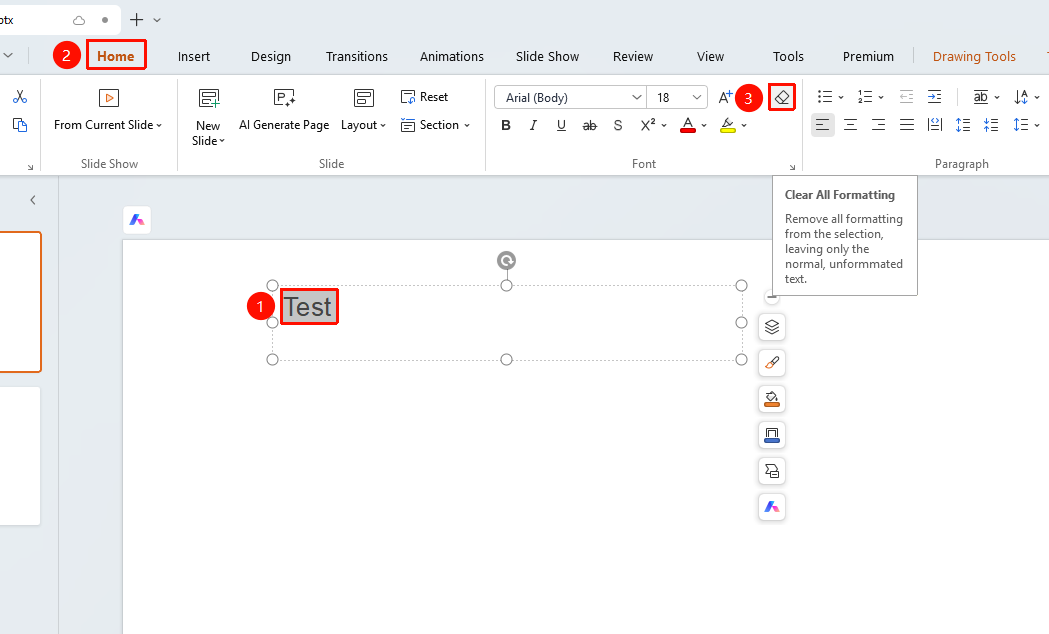
Feature Entry ①
"Home" tab → "Clear Formatting" button
- Select the text content from which you want to clear formatting.
- Click the "Clear Formatting" button on the "Home" tab.
- All formatting of the selected text is cleared, and the text is restored to its default plain text style.
Feature Entry ②
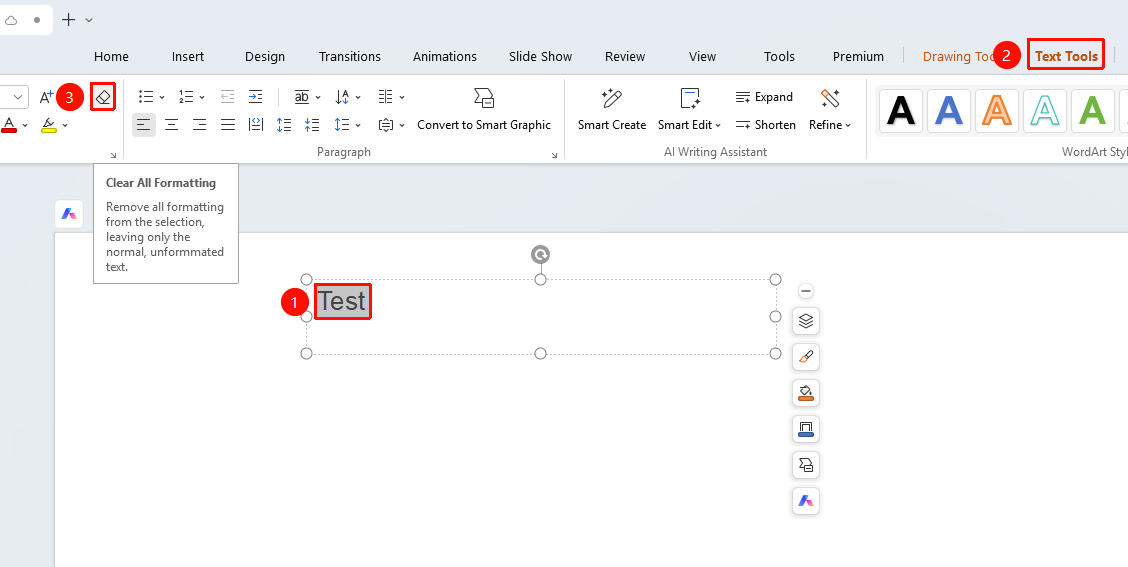
"Text Tools" tab → "Clear Formatting" button
- Select the text content from which you want to clear formatting.
- Click the "Clear Formatting" button on the "Text Tools" tab.
- All formatting of the selected text is cleared, and the text is restored to its default plain text style.
FAQ
Question 1: Does clearing formatting delete the text content?
- Solution: Clearing formatting only removes the formatting attributes of the text (such as font, font size, color, bold, italic, and underline). It does not delete the text content itself. The text is retained but restored to its default format.
Question 2: What is the difference between clearing formatting and undoing an action?
- Solution: Clearing formatting is an active feature specifically designed to remove text formatting while retaining content. Undoing (Ctrl+Z) rolls back to the previous operation state. If you accidentally clear formatting, you can use Undo to restore it.
Question 3: Can I clear only part of the formatting?
- Solution: The Clear Formatting feature in WPS Slides removes all formatting. If you need to retain certain formatting (for example, clearing only color but keeping bold), we recommend manually clearing formatting item by item, or using the Format Painter to copy formatting from unformatted text.
Notes
- For text that uses styles, clearing formatting will detach it from the original style and convert it to plain text format.
- You can use the "Undo" feature to roll back operations.
- Before using this feature, we recommend confirming whether the selection is correct to avoid accidentally clearing formatting from text that does not need to be processed.