Feature Summary
In WPS Slides collaboration mode, set the display aspect ratio of slides, supporting multiple ratios such as Widescreen 16:9, Standard 4:3, and Portrait 9:16.
Feature Description
| Feature Dimension | Description |
|---|---|
| Membership Restriction | No membership restriction |
| Version Restriction | No version restriction |
Operation Steps
Set Slide Aspect Ratio
Feature Entry
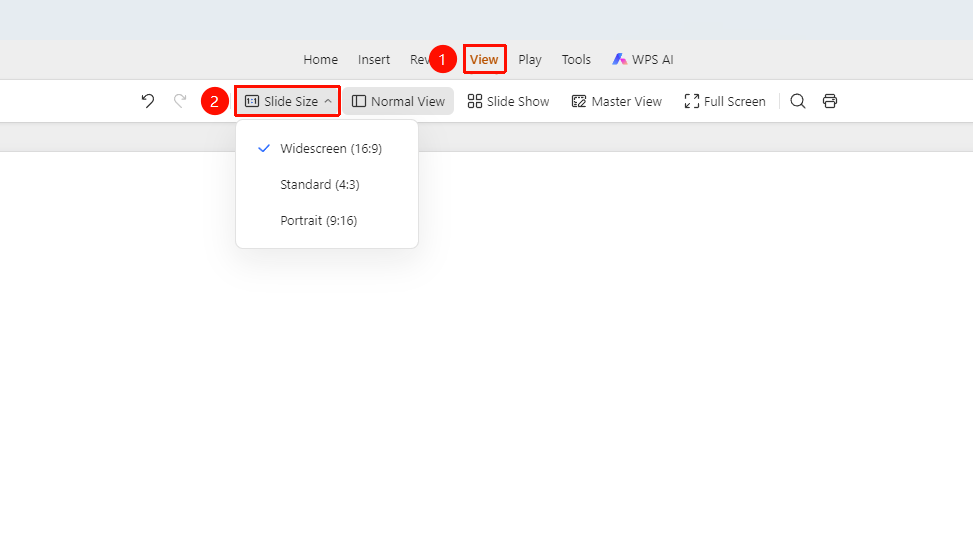
「View」 tab → 「Slide Aspect Ratio」 drop-down menu
- Click the 「View」 tab in the top menu bar
- Click the 「Slide Aspect Ratio」 drop-down button in the toolbar
- Select the desired ratio from the pop-up drop-down menu:
- Widescreen 16:9: Current default ratio
- Standard 4:3: Traditional ratio
- Portrait 9:16: Suitable for mobile phone portrait display
FAQ
Q1: How to choose the appropriate slide aspect ratio?
- Solution: Choose based on the presentation scenario: 16:9 is recommended for computer presentations, 4:3 for traditional projectors, and 9:16 for mobile phone display.
Q2: What to do if content becomes distorted after switching the aspect ratio?
- Solution: After switching the aspect ratio, you need to readjust the position and size of objects on the slides. It is recommended to determine the aspect ratio before creating new slides.
Notes
- It is recommended to determine the slide aspect ratio before starting production
- Switching the aspect ratio will affect the display effect of all slides
- Existing content may need manual adjustment after switching the aspect ratio