Feature Summary
WPS Slides local mode supports word translation, allowing you to quickly translate selected text into other languages.
Feature Description
| Feature Dimension | Description |
|---|---|
| Membership Restriction | No membership restriction |
| Version Restriction | No version restriction |
Operation Steps
Translate via the Home Tab
Feature Entry
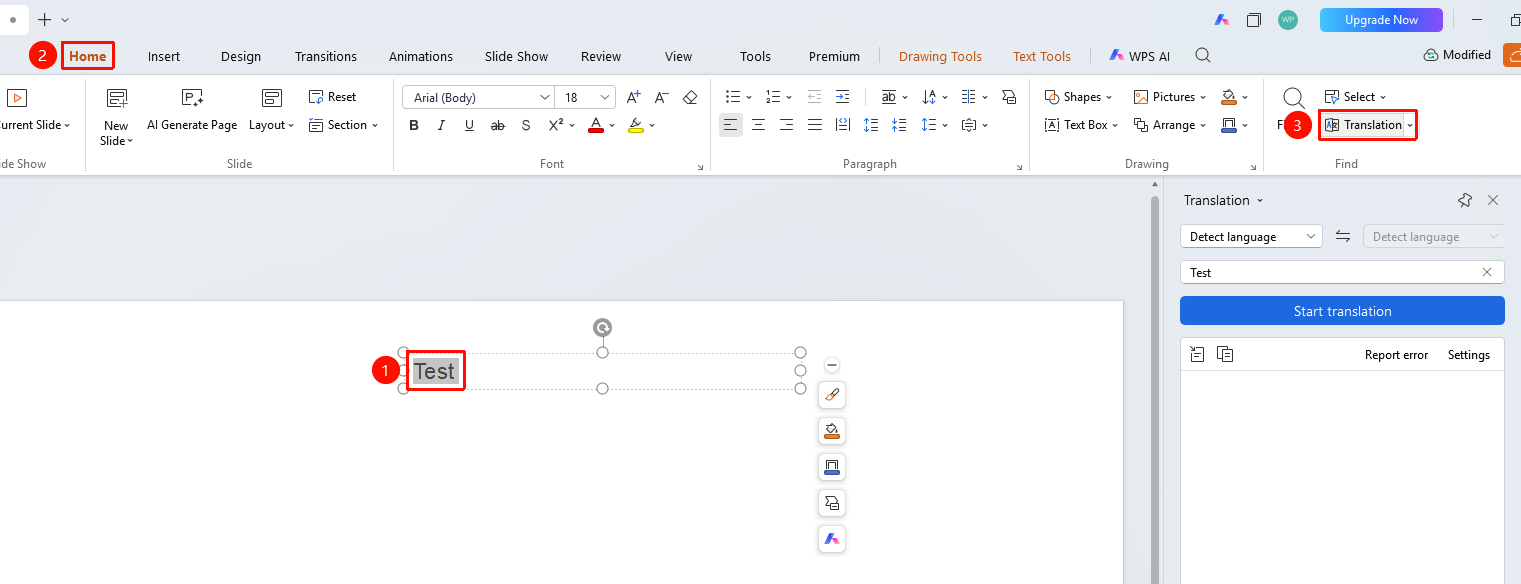
"Home" tab → "Translate" button
- Select the text content to be translated
- Click the "Home" tab in the top menu bar
- Click the "Translate" button
- View the translation result in the translation panel
- Click to copy or insert the translation result
FAQ
Q1: Which languages are supported for translation?
- Solution: Supports mutual translation between multiple languages including Chinese, English, Japanese, and Korean.
Q2: Does word translation require an internet connection?
- Solution: Yes, the word translation feature requires an internet connection to function.
Notes
- The selected text should not be too long
- Translation results are for reference only