Feature Summary
The eraser feature is used to erase row and column dividers in tables, allowing you to quickly remove unwanted borders, achieve cell merging effects, or create special table structures.
Feature Description
| Feature Dimension | Description |
|---|---|
| Membership Restriction | No membership restriction |
| Version Restriction | No version restriction |
Operation Steps
Activating the Eraser Feature
Feature Entry
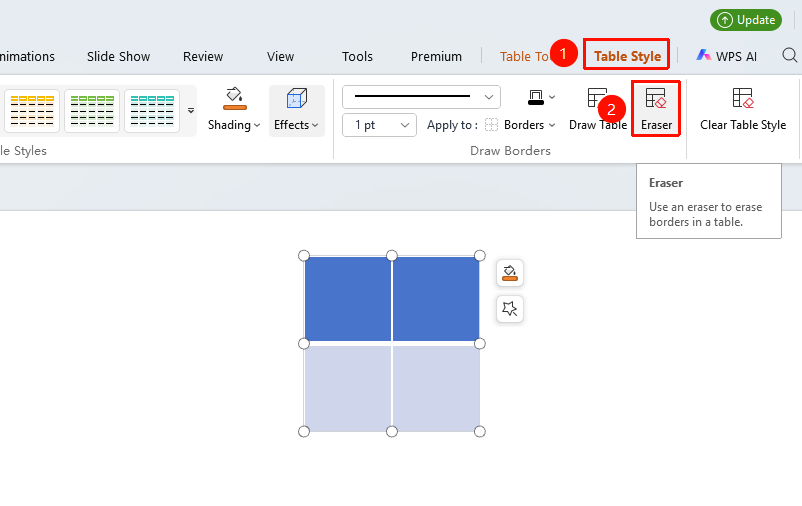
"Table Style" tab → "Eraser" button
- Click the "Table Style" tab
- Click the "Eraser" button
- The mouse cursor changes to an eraser shape
Using the Eraser to Delete Table Borders
Feature Entry
"Table Style" tab → "Eraser"
- After activating the eraser feature, the mouse cursor changes to an eraser icon
- Move the mouse over the table border you want to delete
- Click the left mouse button when the border is highlighted
- The border is deleted, and adjacent cells are merged
Exiting Eraser Mode
Feature Entry
"Esc" key or clicking another feature
- After finishing border deletion
- Press the Esc key to exit eraser mode
- Or click another feature button to exit automatically
- The mouse cursor returns to its normal shape
Frequently Asked Questions
Q1: Where can I find the eraser feature if I can't locate it?
- Solution: You need to select the table first; then you can see the eraser button in the Table Style tab. If no table is selected, the related features will not be displayed.
Q2: How to recover a table border that was deleted by mistake?
- Solution: Use Ctrl+Z to undo the operation and restore the mistakenly deleted border. Alternatively, use the "Draw Table" or "Borders" feature to redraw the deleted line.
Q3: How to merge cells after deleting borders with the eraser?
- Solution: Deleting borders with the eraser has the same effect as merging cells. Deleting the border between adjacent cells achieves cell merging.
Notes
- The eraser can delete internal table borders; for outer borders, it can only erase the border lines
- Adjacent cells will automatically merge after borders are deleted
- You must exit eraser mode before performing other operations