Feature Summary
The custom master font feature is used to set fonts in the master, unifying the font style of the presentation.
Feature Description
| Feature Dimension | Description |
|---|---|
| Membership Restriction | No membership restriction |
| Version Restriction | No version restriction |
Steps
Custom Master Font
Feature Entry
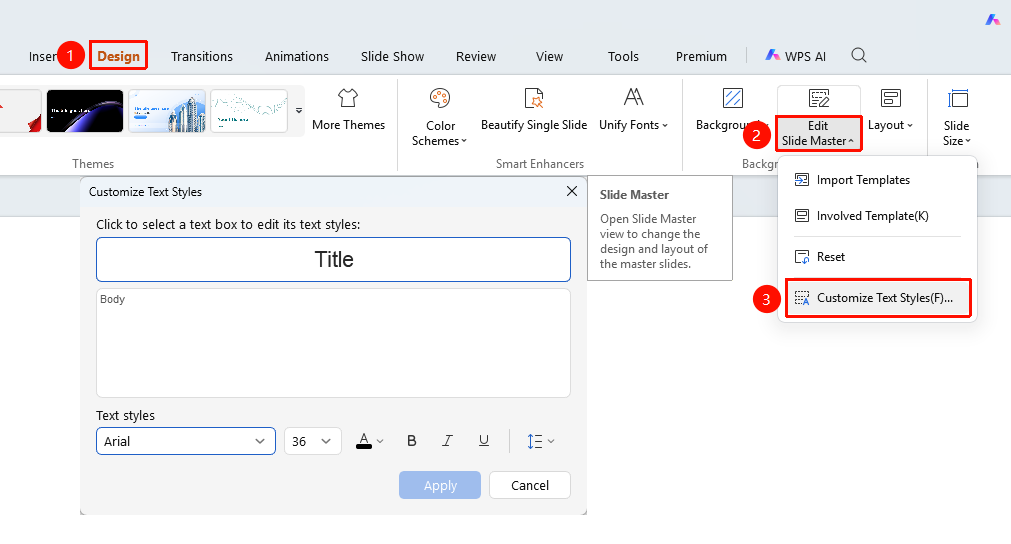
Design" tab → "Master" → "Custom Master Font"
- Click the top "Design" tab
- Click the "Master" dropdown button
- Select the "Custom Master Font" option
- In the pop-up dialog, set the title font and body font
- Click "OK" to save the settings
FAQ
Q1: Can I set the title font and body font separately?
- Solution: Yes, you can set the title font and body font separately in the dialog.
Notes
- Font settings will affect the font style of the entire presentation
- Ensure the selected fonts are available on the target device