Feature Summary
WPS Slides local mode supports converting slide content into a WPS Document, making it easy to edit and share text content.
Feature Description
| Feature Dimension | Description |
|---|---|
| Membership Restriction | No membership restriction |
| Version Restriction | No version restriction |
Operation Steps
Convert via Right-Click Menu
Feature Entry
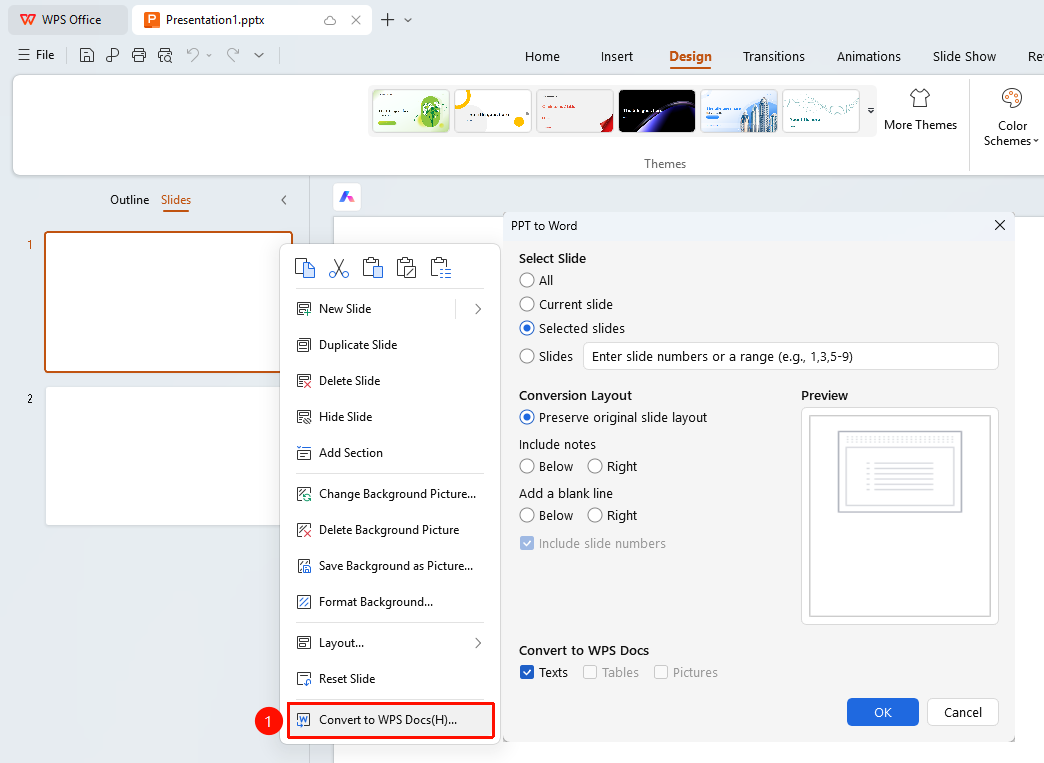
Left thumbnail pane → Right-click → "Convert to Docs"
- In the left slide thumbnail pane, select the slides you want to convert
- Right-click the selected slides
- Select the "Convert to Docs" option
- Set conversion options in the pop-up dialog box
- Click the "OK" button to complete the conversion
FAQ
Q1: Will content be lost after conversion?
- Solution: Text, Sheets content, and image content will be retained.
Q2: How to convert the entire presentation?
- Solution: Select all slides, then right-click and choose the conversion option, or select all slides in the conversion settings.
Q3: What is the format of the converted document?
- Solution: A WPS Document will be generated after conversion, which you can continue to edit.
Notes
- The conversion feature primarily performs Extract Text