Feature Summary
The attachment feature allows you to insert file attachments into slides, supporting embedding files of various formats for opening and viewing during the presentation.
Feature Description
| Feature Dimension | Description |
|---|---|
| Membership Restriction | No membership restriction |
| Version Restriction | No version restriction |
Steps
Insert Attachment
Feature Entry
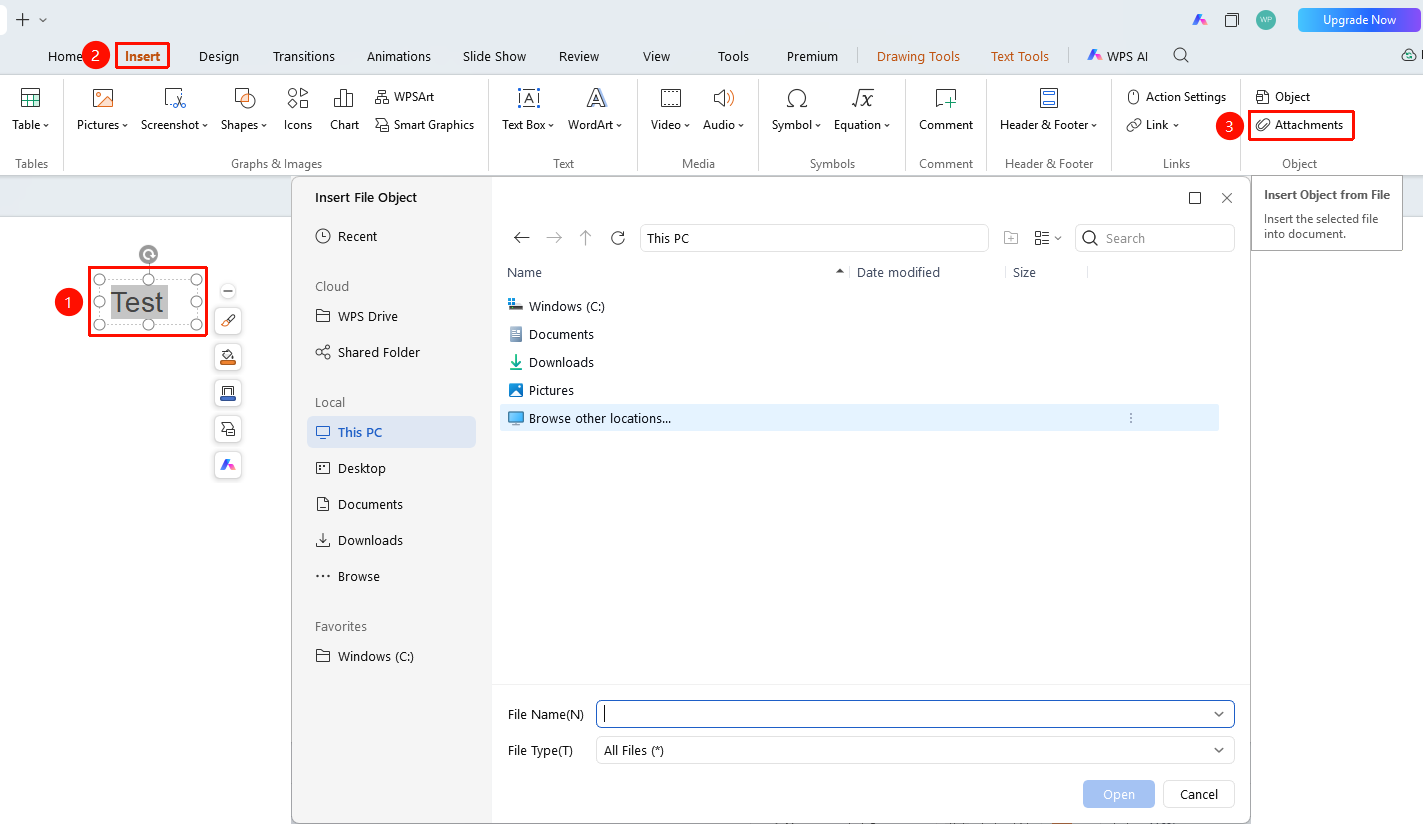
"Insert" tab → "Attachment" button
- Click the "Insert" tab at the top
- Click the "Attachment" button
- Select the file you want to insert in the pop-up dialog box
- Click "Open" to complete the insertion
- The attachment will appear as an icon in the slide
FAQ
Q1: What types of files can be inserted
- Solution: Supports inserting files of various formats, such as PDF, Word, Excel, images, etc.
Q2: How to open an inserted attachment
- Solution: Double-click the attachment icon to open the file. It needs to be viewed in software that supports that format.
Notes
- Inserting attachments will increase the file size of the presentation
- It is recommended to insert only necessary files to avoid making the file too large