Summary
The text glow effect generates a soft halo around text, creating a luminous, neon-like visual effect. It is ideal for creating tech-themed, dreamy-style, or visually focused text content.
Feature Description
| Feature Dimension | Description |
|---|---|
| Membership Restriction | No membership restriction |
| Version Restriction | No version restriction |
Steps
Apply Preset Glow
Feature Entry
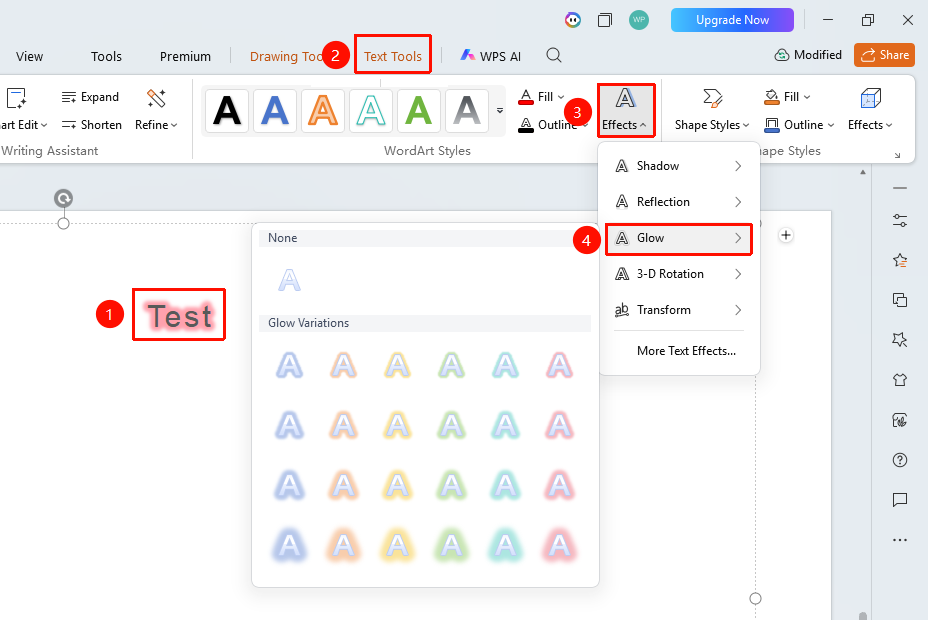
「Text Tools」 tab → 「Text Effects」 → 「Glow」
- Select the text content to which you want to add a glow effect
- Under the 「Text Tools」 tab, click 「Text Effects」→「Glow」
- In the pop-up panel, select a preset glow style (halos of different colors and sizes)
- The corresponding glow effect will appear around the text
Custom Glow Parameters
Feature Entry
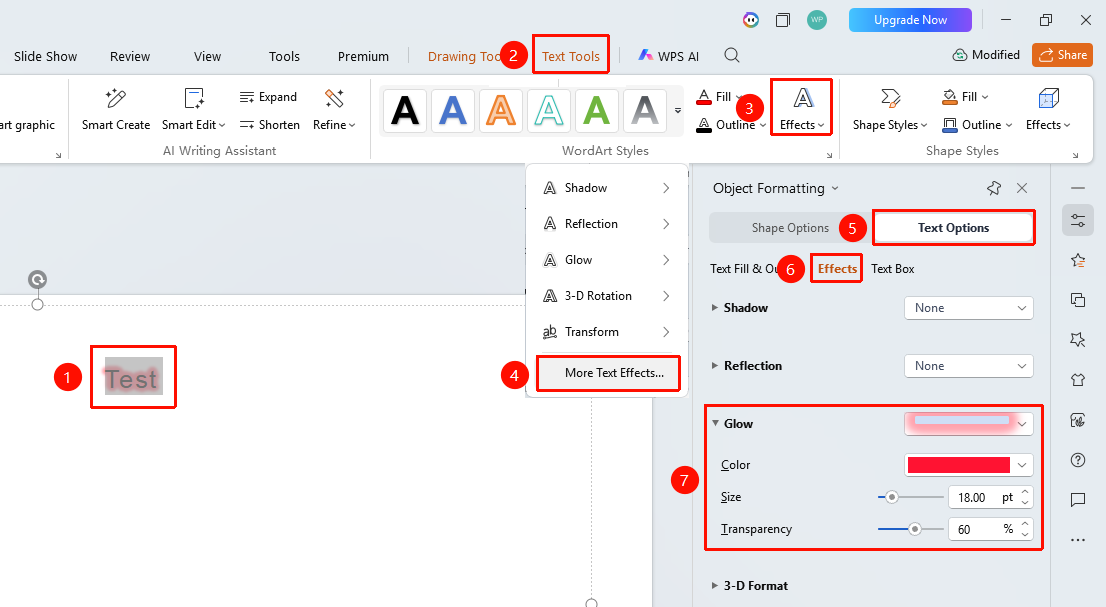
「Text Tools」 tab → 「Text Effects」 → 「More Settings」 → 「Text Options」 → 「Effects」 → 「Glow」
- Select the target text, and click 「Text Effects」 under the 「Text Tools」 tab
- Click → 「More Settings」 option to expand the 「Object Properties」 right-side panel
- Click the 「Effects」 option under the 「Text Options」 tab
- Click 「Glow」 to open the detailed settings panel
- Adjust the glow Color to select the halo color
- Adjust the Size to control the spread range of the halo
- Adjust the Transparency to control the visibility of the halo
FAQ
Q1: What presentation styles are suitable for the glow effect?
- Solution: The glow effect is particularly suitable for presentations with strong visual impact, such as tech themes, night scene themes, neon styles, and game styles. The glow effect works better on dark backgrounds.
Q2: What should I do if the glow effect is too strong and the text becomes blurry?
- Solution: Reduce the glow Size value and increase the Transparency value to make the halo lighter. Also, ensure that the text itself uses a high-contrast fill color so that the main text remains clear and legible.
Notes
- The glow effect works best on dark backgrounds
- The glow color is usually chosen to be the same as or complementary to the text color
- Excessive glow effects can make the page look cluttered; it is recommended to use them in moderation