Feature Summary
The WPS Art Graphic Style feature is used to apply preset visual styles, including combinations of fills, outlines, and effects, to WPS Art graphics, quickly beautifying the graphic's appearance.
Feature Description
| Feature Dimension | Description |
|---|---|
| Membership Restriction | No membership restriction |
| Version Restriction | No version restriction |
Operation Steps
Apply Graphic Style
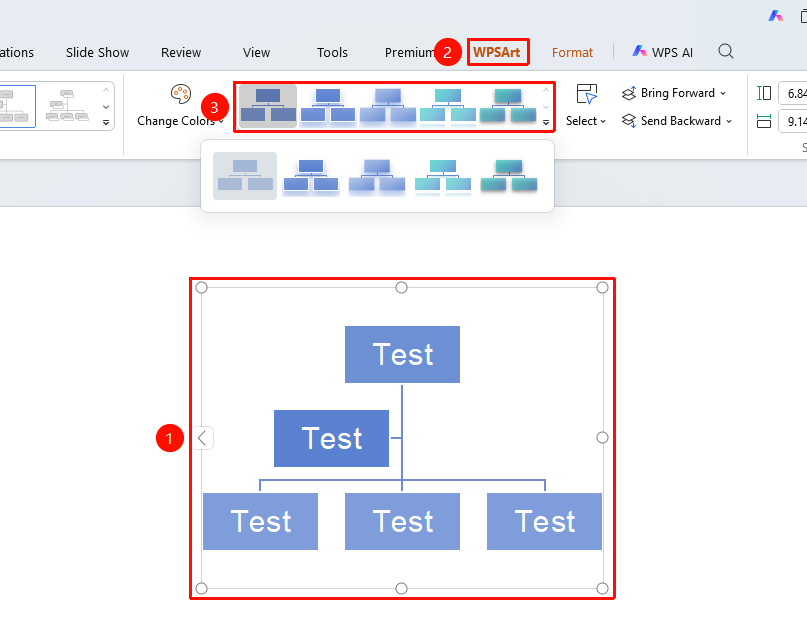
Feature Entry ①
"Design" tab → WPSArt Graphic Style area
- Select the WPS Art graphic
- Click the top "Design" tab
- Select a preset style in the WPSArt Graphic Style area
- Click the style to apply it
Floating Edit Bar Settings
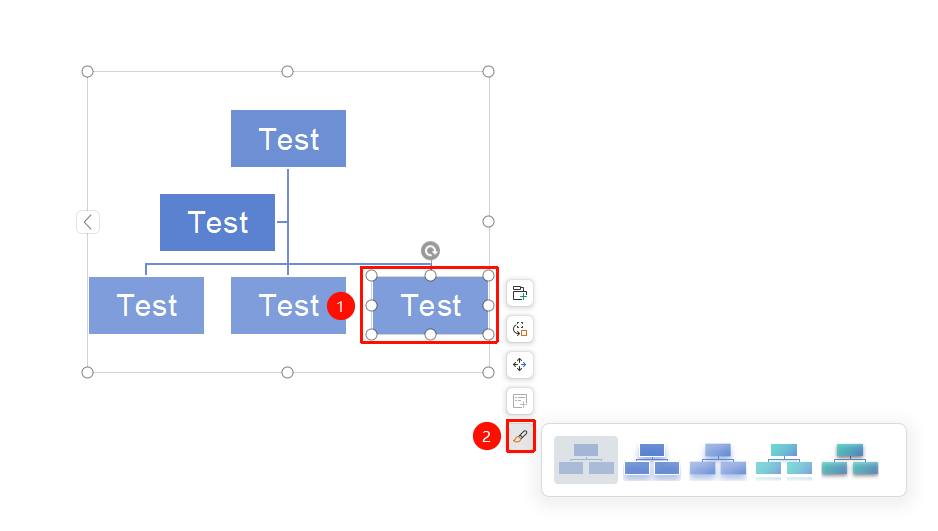
Feature Entry ②
Floating Edit Bar → "Shape Style"
- Select the WPS Art graphic
- Click the "Shape Style" button in the floating edit bar
- Select a preset style to apply it
Frequently Asked Questions
Question 1: What is the difference between graphic style and layout
- Solution: Layout changes the graphic's structural arrangement, while graphic style changes the graphic's visual effects (color, outline, shadow, etc.).
Question 2: How to expand more style options
- Solution: Click the expand button in the lower right corner of the style area to view the complete style library.
Notes
- The graphic style will be applied to the entire WPS Art graphic
- Applying a new style will overwrite the previous style settings