Summary
The WPS Art Layout feature is used to switch the overall layout style of WPS Art, allowing you to change the graphic's arrangement and appearance without altering its content.
Feature Description
| Feature Dimension | Description |
|---|---|
| Membership Restriction | No membership restriction |
| Version Restriction | No version restriction |
Steps
Switch Layout
Feature Entry
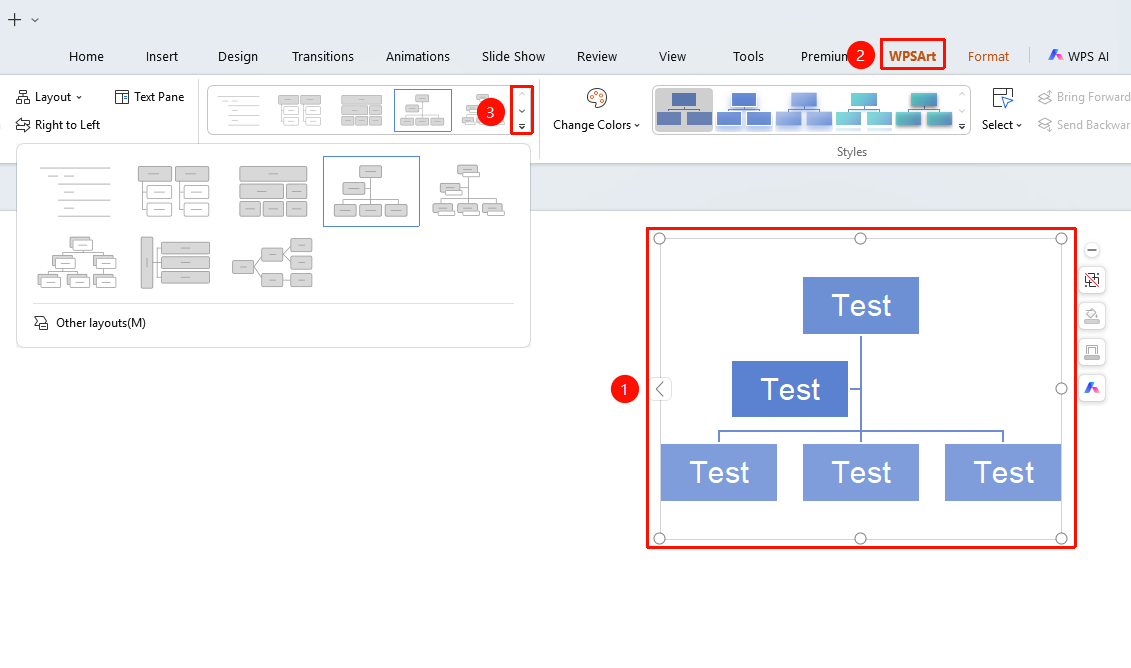
"Design" tab → Drop-down button on the right side of the Layout area
- Select the WPS Art graphic
- Click the "Design" tab at the top
- Click the drop-down button on the right side of the Layout area to browse different layout styles
- Click the desired layout to apply it
- For more layouts, click "Other Layouts" to expand the full layout list
FAQ
Q1: Will switching layouts cause content loss?
- Solution: No, switching layouts only changes the arrangement and appearance. Text content will be preserved and automatically adapted to the new layout.
Notes
- Switching layouts may affect the hierarchical display of the graphic
- It is recommended to save the current version before switching