Feature Summary
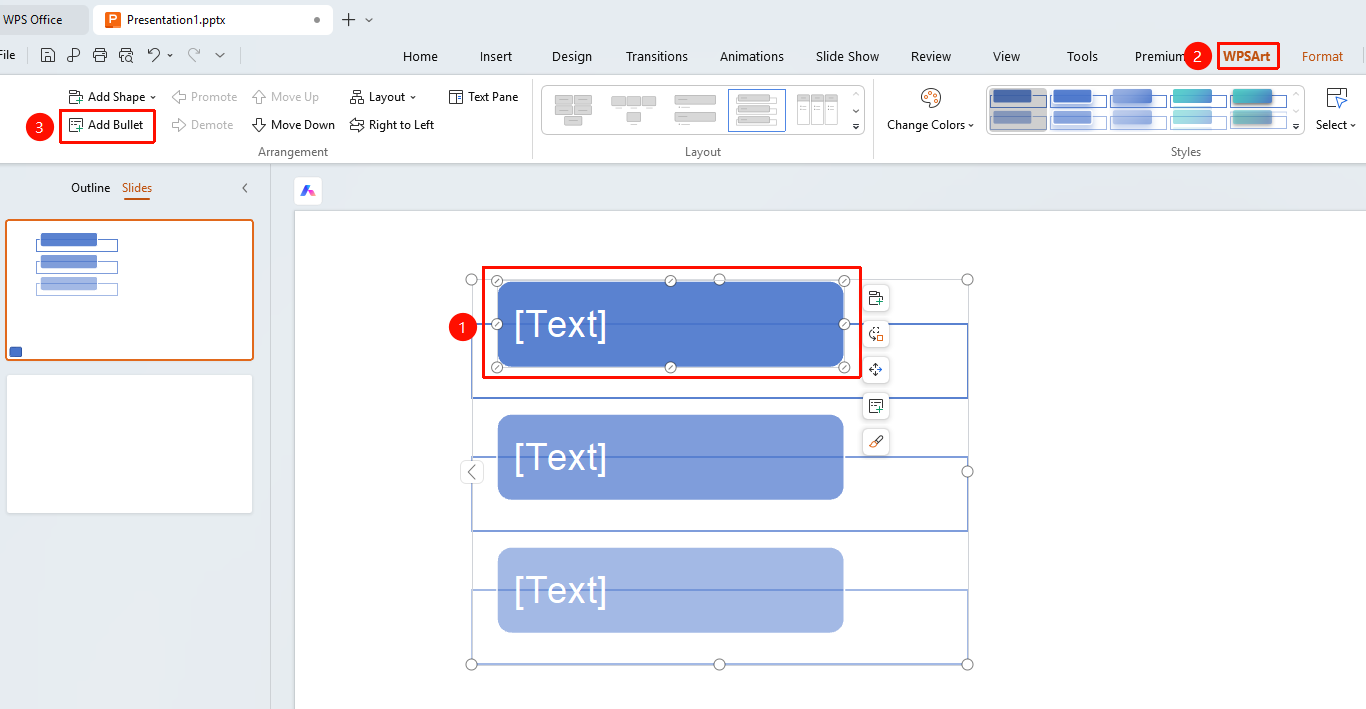
The WPS Art Add Bullet feature is used to add text bullets in smart shapes and is only available in shapes that support bulleted text.
Feature Description
| Feature Dimension | Description |
|---|---|
| Membership Restriction | No membership restriction |
| Version Restriction | No version restriction |
Steps
Add Bullet
Feature Entry
"Design" tab → "Add Bullet"
- Select an item in the WPS Art graphic
- Click the top "Design" tab
- Locate and click the "Add Bullet" button
- Add a bullet to the current item
FAQ
Q1: Why is the Add Bullet button grayed out?
- Solution: The currently selected shape does not support the bullet feature. Only shapes that support bulleted text can use this feature.
Notes
- The bullet feature is only available in shapes that support bulleted text.