Feature Summary
The WPS Art Alt Text feature is used to add optional text descriptions to WPS Art graphics, serving as supplementary information in properties to facilitate accessibility and aid comprehension.
Feature Description
| Feature Dimension | Description |
|---|---|
| Membership Restriction | No membership restriction |
| Version Restriction | No version restriction |
Steps
Add Alt Text
Feature Entry
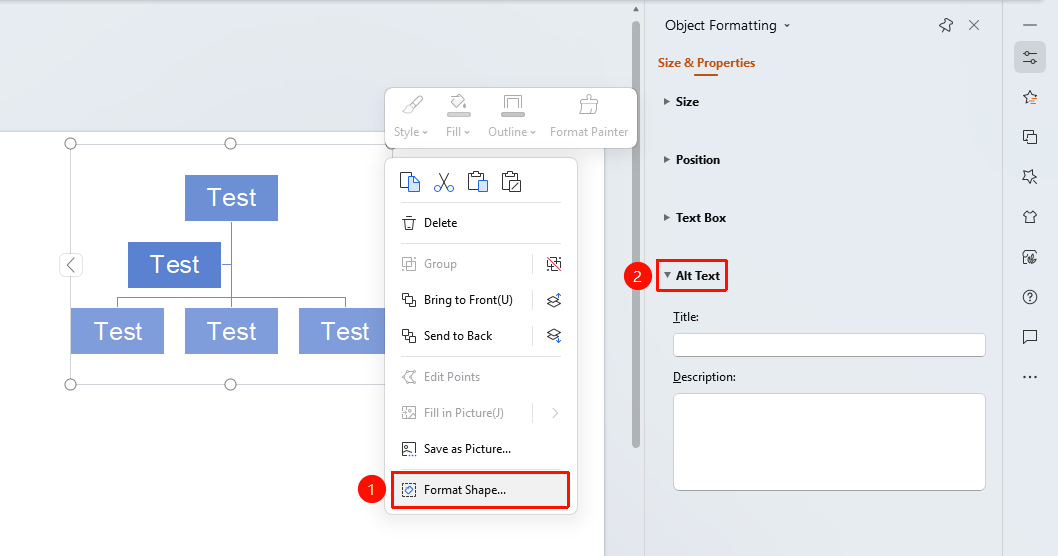
WPS Art right-click menu → "Format Object"
- Select the WPS Art graphic you want to add alt text to
- Right-click the graphic
- Select "Format Object"
- In the "Object Properties" sidebar on the right, click the "Size & Properties" tab
- Expand "Alt Text" to set the title and description
- "Title": Enter the shape title
- "Description": Enter the shape description text
Side Task Pane Settings
Feature Entry
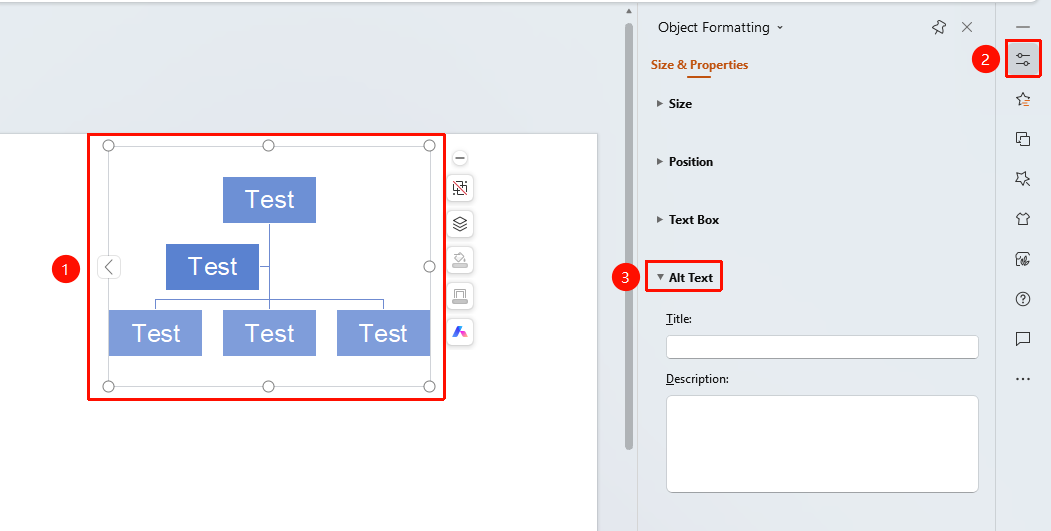
Side "Task Pane" → "Object Properties"
- Select the graphic you want to add alt text to
- Click the "Object Properties" button on the side
- Set the alt text in the "Object Properties" sidebar
FAQ
Q1: Will the description text appear on the slide?
- Solution: No, alt text is saved only as metadata and will not be displayed during the slideshow.
Notes
- It is recommended to add alt text to important WPS Art graphics
- The description text should concisely summarize the graphic content