Feature Summary
The WPS Art Convert to Shape feature is used to convert WPS Art graphics into regular shape groups, preserving the graphic appearance but losing the smart editing capabilities of WPS Art.
Feature Description
| Feature Dimension | Description |
|---|---|
| Membership Restriction | No membership restriction |
| Version Restriction | No version restriction |
Operation Steps
Convert to Shape
Feature Entry
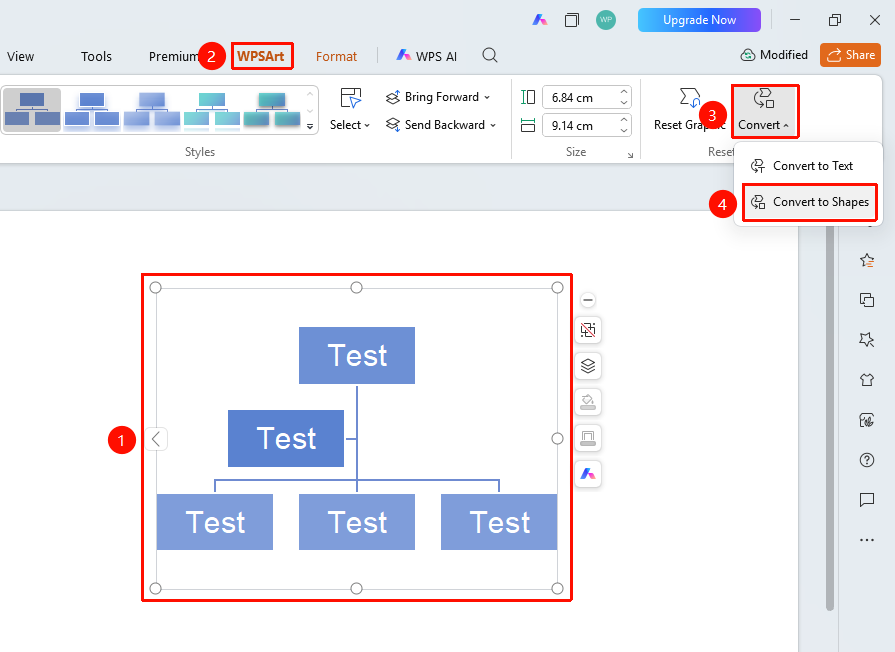
"Design" tab → "Convert" → "Convert to Shape"
- Select the WPS Art graphic
- Click the top "Design" tab
- Locate and click the "Convert" button
- Select "Convert to Shape"
- The WPS Art graphic will be converted into a regular shape group
Frequently Asked Questions
Q1: Can I edit text after conversion?
- Solution: Yes, after conversion, double-clicking the shape still allows text editing, but features like WPS Art's promote/demote will no longer be available.
Q2: Can I revert to WPS Art after conversion?
- Solution: You can immediately use the "Undo" button to undo. Once the file is saved after conversion, it cannot be directly reverted.
Q3: Can I move an individual shape after conversion?
- Solution: Yes, after conversion, the shapes will be automatically grouped. Double-click to enter group Read Mode, and you can then move or modify an individual shape separately.
Q4: When should I convert to shape?
- Solution: When you need more flexible editing of the graphic, such as individually adjusting a shape's style, position, or performing shape operations.
Notes
- The conversion operation is irreversible; please save the original file beforehand
- After conversion, the smart editing capabilities of WPS Art will be lost