Feature Summary
The WPS Art Convert to Text feature is used to convert WPS Art graphics into plain text format, preserving the text content but removing all graphic styles and structures.
Feature Description
| Feature Dimension | Description |
|---|---|
| Membership Restriction | No membership restriction |
| Version Restriction | No version restriction |
Operation Steps
Convert to Text
Feature Entry
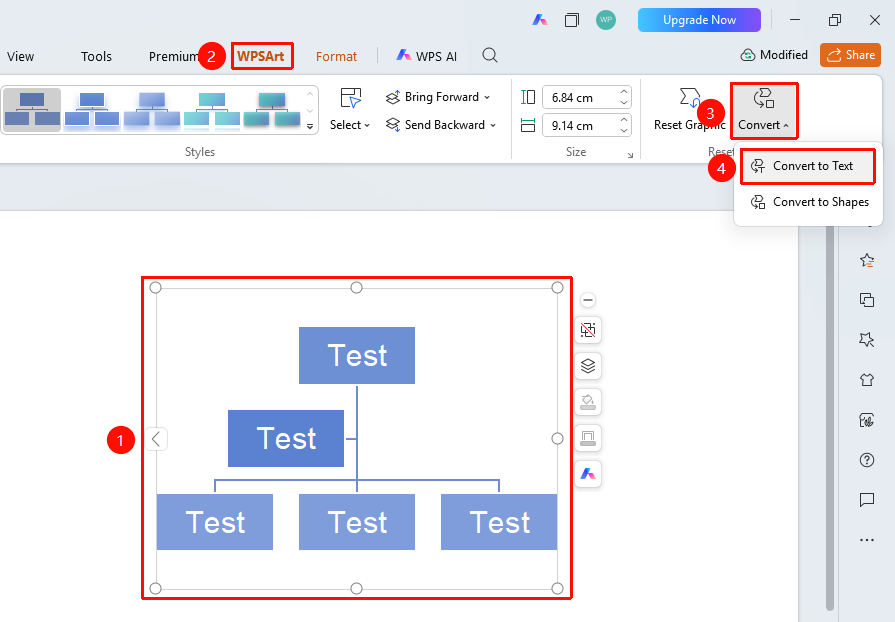
"Design" tab → "Convert" → "Convert to Text"
- Select the WPS Art graphic
- Click the top "Design" tab
- Locate and click the "Convert" button
- Select "Convert to Text"
- The WPS Art graphic will be converted into a bulleted text list
FAQ
Q1: Can it be restored to WPS Art after conversion?
- Solution: You can immediately use the "Undo" button to undo the operation. If the file has been converted and saved, it cannot be directly restored; you will need to re-insert the WPS Art and copy the text content.
Q2: What content is retained after conversion?
- Solution: Only the text content is retained after conversion, presented as a bulleted list. The graphic styles are completely removed.
Q3: What is the format of the converted text?
- Solution: The converted text will be displayed using different levels of bullet indentation based on the original hierarchical relationship.
Notes
- The conversion operation is irreversible; please save the original file in advance
- Only text is retained after conversion; graphic styles will be lost