Feature Summary
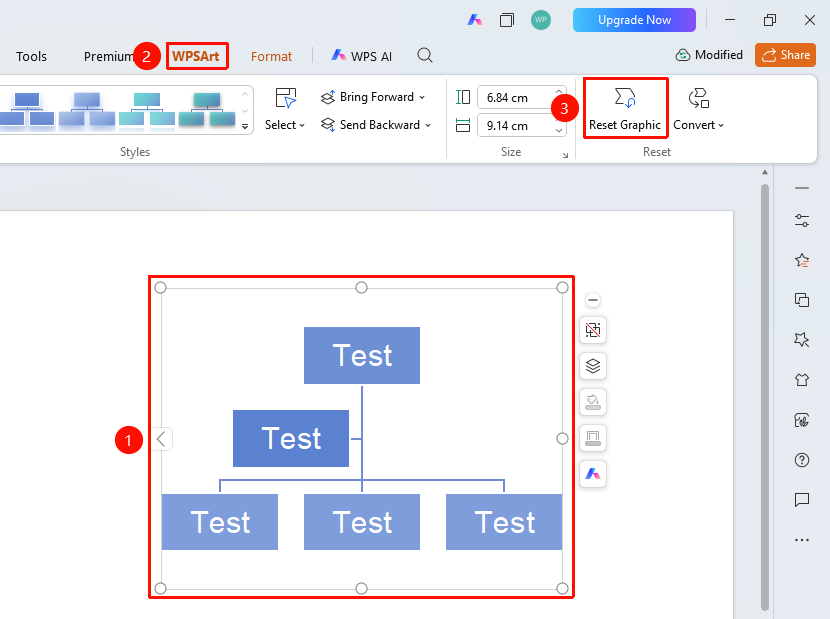
The WPS Art Reset Graphic feature is used to restore a WPS Art graphic to its default state, undoing all formatting changes made to the graphic, including modifications to color, style, etc.
Feature Description
| Feature Dimension | Description |
|---|---|
| Membership Restriction | No membership restriction |
| Version Restriction | No version restriction |
Steps
Reset Graphic
Feature Entry
"Design" tab → "Reset Graphic"
- Select the WPS Art graphic
- Click the top "Design" tab
- Locate and click the "Reset Graphic" button
- The graphic will be restored to the default style it had when inserted
FAQ
Q1: Will resetting the graphic delete content?
- Solution: No, resetting the graphic only restores the formatting style; text content will be retained.
Q2: Can the reset be undone?
- Solution: Yes, you can use Ctrl+Z to undo the reset operation.
Q3: What is the difference between resetting the graphic and re-inserting it?
- Solution: Reset only restores the style while retaining content and layer structure; re-inserting completely replaces it and requires re-entering the content.
Notes
- It is recommended to confirm whether you need to keep the current style before resetting.