Feature Summary
The Icon Style feature is used to apply preset style effects to icons, allowing you to quickly beautify the appearance of icons.
Feature Description
| Feature Dimension | Description |
|---|---|
| Membership Restriction | No membership restriction |
| Version Restriction | No version restriction |
Operation Steps
Apply Icon Style
Feature Entry
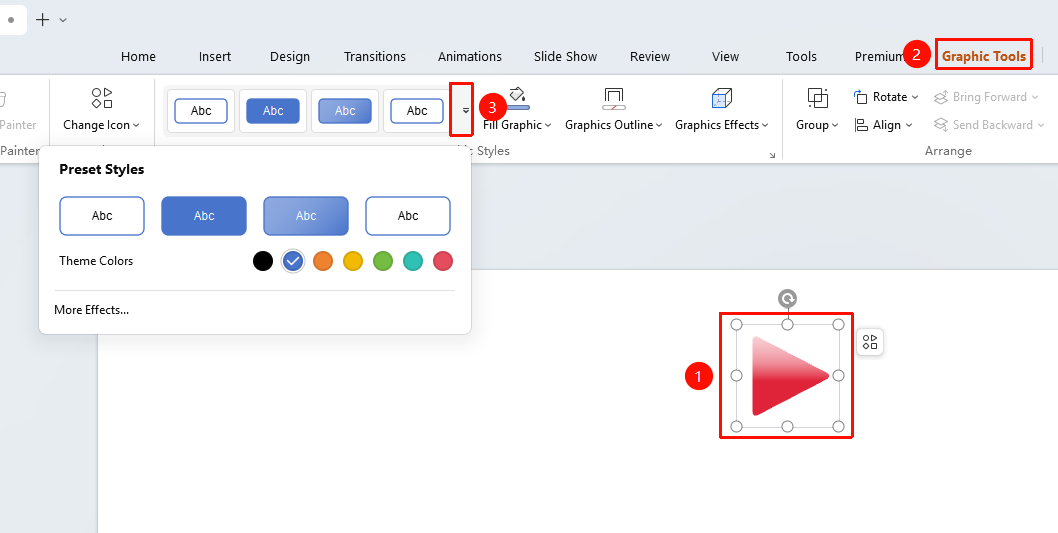
"Icon Tools" tab → "Icon Styles"
- Select the icon to which you want to apply a style
- Switch to the top "Icon Tools" tab, click the dropdown button on the right side of "Icon Styles"
- Select a preset style or theme color in the shape styles area
- Click the style to apply it to the icon
- Click "More Settings" to expand the object properties panel on the right to view/set specific icon properties
FAQ
Q1: Can I modify the style after applying it?
- Solution: Yes, after applying a style, you can individually modify parameters such as fill, outline, and effects.
Notes
- Applying an icon style will overwrite previous fill and outline settings