Feature Summary
The shadow effect feature is used to add shadows to shapes, giving them a three-dimensional visual appearance.
Feature Description
| Feature Dimension | Description |
|---|---|
| Membership Restriction | No membership restriction |
| Version Restriction | No version restriction |
Operation Steps
Applying Shadow Effects
Feature Entry
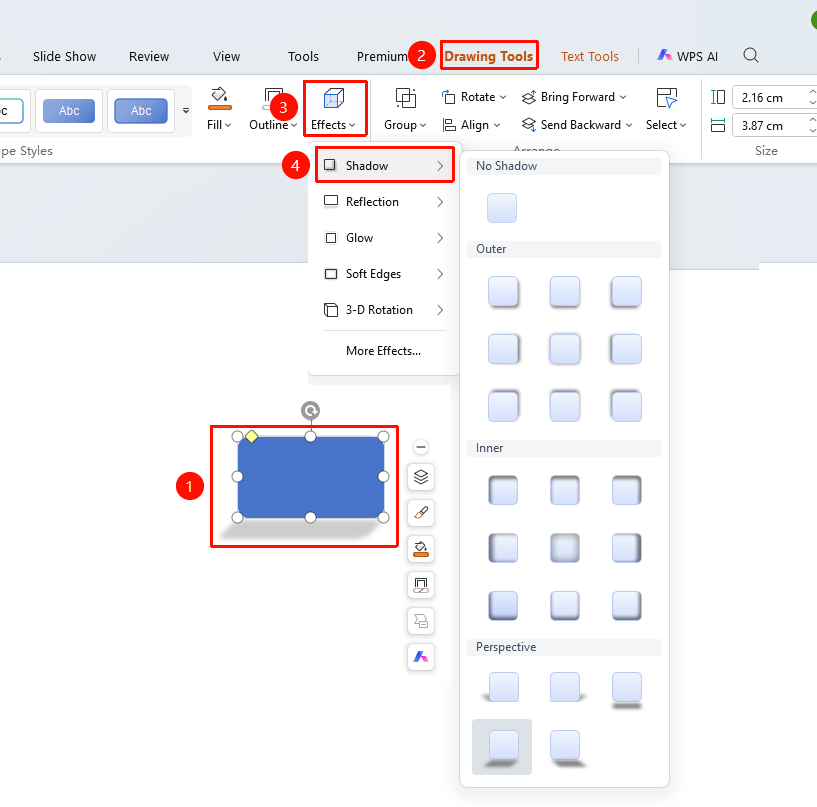
"Drawing Tools" tab → Shape Styles area → "Effects" → "Shadow"
- Select the shape you want to add a shadow to
- Click the "Drawing Tools" tab at the top
- Locate and click the "Effects" button
- Select "Shadow" to expand and choose from the following styles
- "Outer": Select an outer shadow preset style
- "Inner": Select an inner shadow preset style
- "Perspective": Select a perspective shadow preset style
- Click the desired shadow style to apply it to the shape with one click
- Click "More Settings" to expand the effects settings panel
Customizing Shadow Effects
Feature Entry
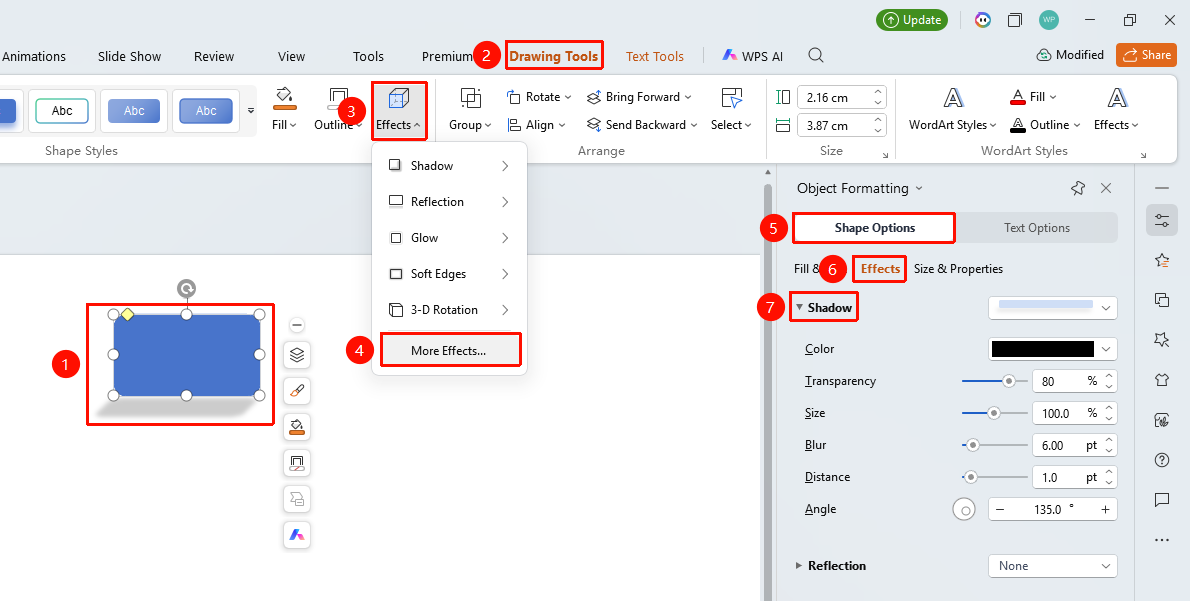
"Drawing Tools" tab → Shape Styles area → "Effects"→ "More Settings" → "Object Properties" → "Shadow"
- Select the shape you want to add a shadow to
- Click the "Drawing Tools" tab
- Click the "Effects" button
- Select "More Settings" to expand the "Object Properties" sidebar on the right
- Configure the following parameters in the "Shadow" settings
- "Preset": Select a preset shadow style
- "Color": Set the shadow color
- "Transparency": Set the shadow transparency (0%~100%)
- "Size": Set the shadow size (0%~200%)
- "Blur": Set the shadow blur level (0 pt~100 pt)
- "Angle": Set the shadow angle (0°~360°)
- "Distance": Set the shadow distance (0 pt~100 pt)
- Preview the effect in real time, click on a blank area to apply
Right-Click Menu Settings
Feature Entry
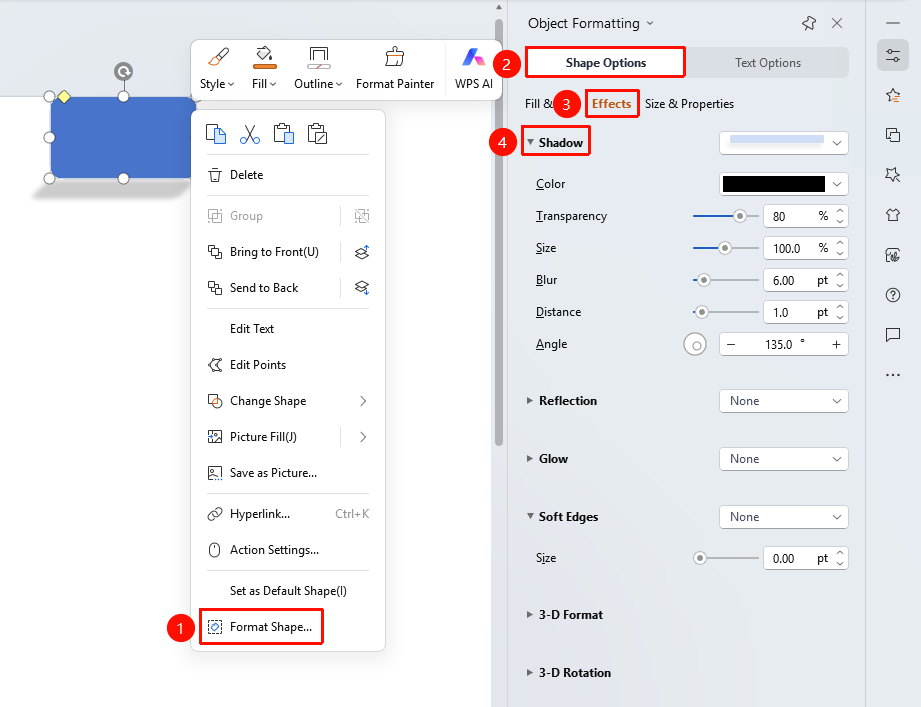
Shape right-click menu → "Format Object"
- Select the shape you want to add a shadow to
- Right-click the shape
- Select "Format Object"
- Set the shadow effect in the "Object Properties" sidebar on the right
Side Task Pane Settings
Feature Entry
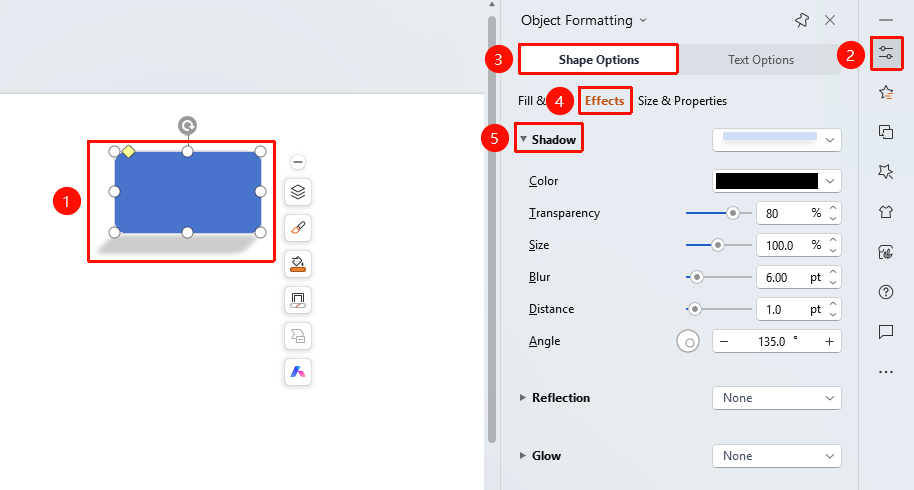
Side "Task Pane" → "Object Properties"
- Select the shape you want to add a shadow to
- Click the "Object Properties" button on the side
- Set the shadow effect in the "Object Properties" sidebar
FAQ
Q1: How to adjust the blur level of the shadow
- Solution: Drag the blur slider or enter a value in the shadow settings. The larger the value, the blurrier the shadow.
Q2: How to set a perspective shadow
- Solution: Select a "Perspective" type shadow style from the preset styles.
Q3: How to remove the shadow effect
- Solution: Select "No Shadow" from the preset styles, or turn off the shadow in the object properties.
Notes
- Shadows give shapes a three-dimensional visual appearance
- Overly strong shadows may affect the readability of the shape
- You can change the direction and position of the shadow by adjusting the angle and distance