Summary
The Color Scheme feature is used to modify the color palette of a presentation, offering multiple preset color combinations to quickly change the overall visual style.
Feature Description
| Feature Dimension | Description |
|---|---|
| Membership Restriction | No membership restriction |
| Version Restriction | No version restriction |
Steps
Modifying a Color Scheme
Feature Entry
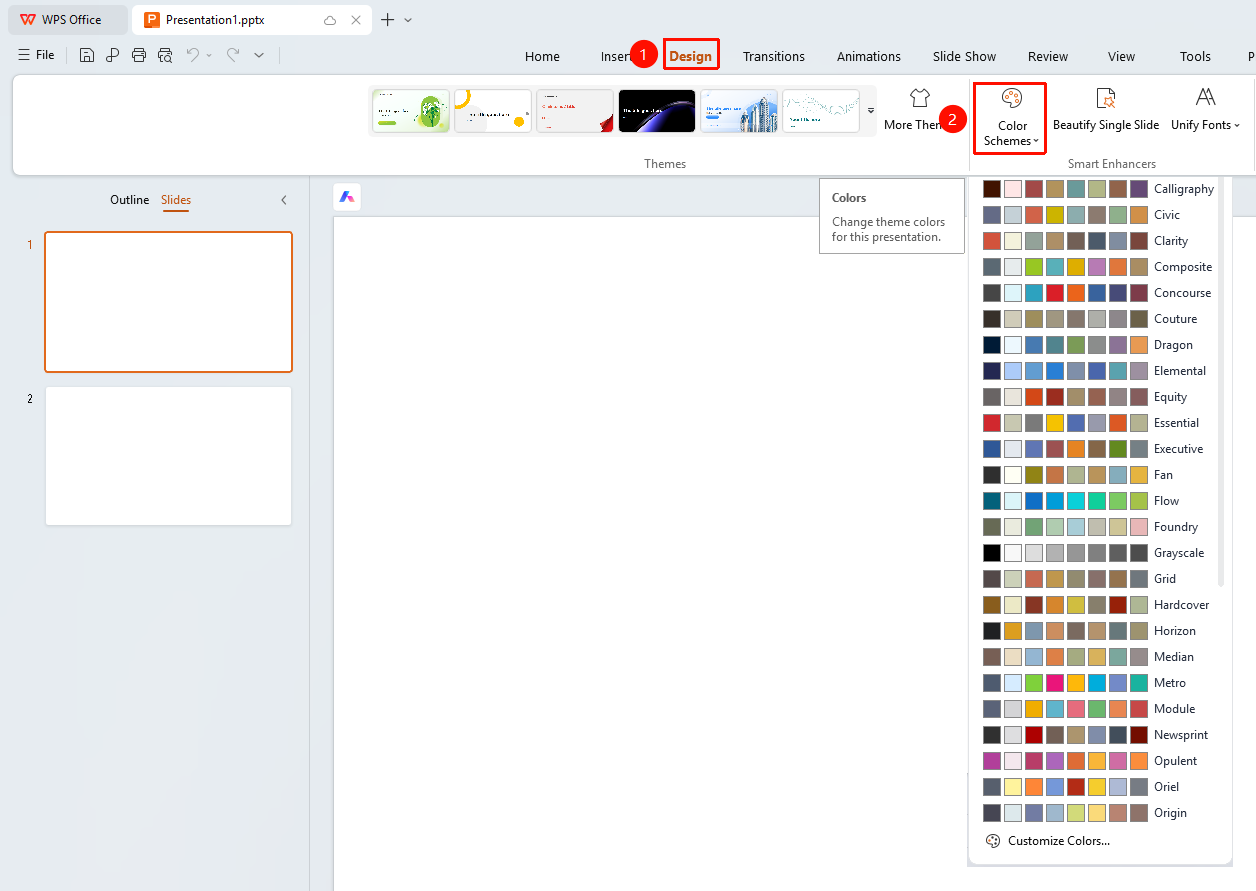
"Design" tab → "Color Scheme" dropdown button
- Click the top "Design" tab
- Click the "Color Scheme" dropdown button
- Select the desired color scheme
- Click "Custom Color" to customize the color scheme
- Click to apply the color scheme
FAQ
Question 1: How to customize colors
- Solution: Click "Design" → "Color Scheme" → "Custom Color" to set each color individually.
Question 2: What is the relationship between color schemes and themes
- Solution: A color scheme is part of a theme; you can modify colors independently without changing other theme elements.
Notes
- Modifying a color scheme will affect all objects using that color
- It is recommended to choose a color scheme with appropriate contrast