Feature Summary
The Shape Save as Picture feature is used to export shapes as image files, making it convenient to use shape content elsewhere.
Feature Description
| Feature Dimension | Description |
|---|---|
| Membership Restriction | No membership restriction |
| Version Restriction | No version restriction |
Steps
Save as Picture
Feature Entry
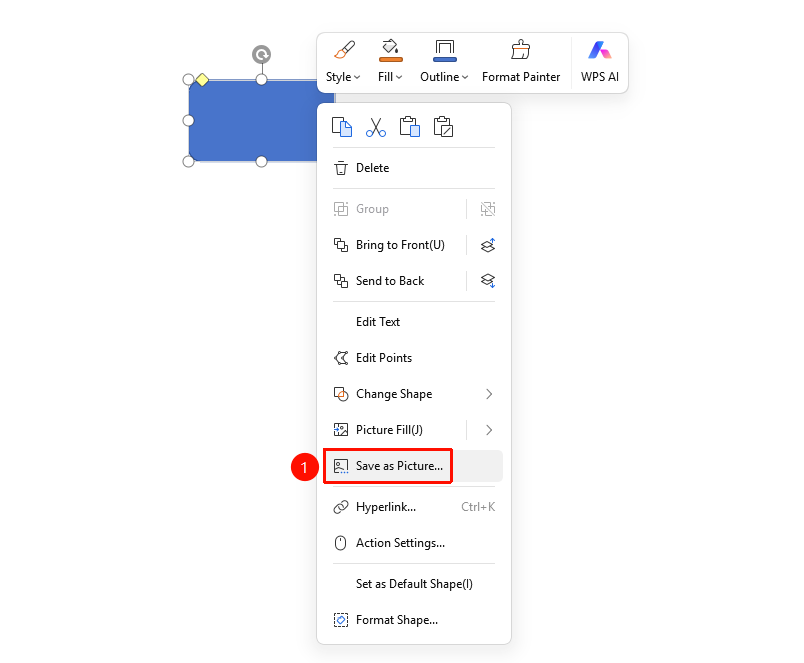
Shape right-click menu → "Save as Picture"
- Select the shape you want to save as a picture
- Right-click the shape
- Select "Save as Picture" from the right-click menu
- Choose the save location and file format in the pop-up dialog
- Click "Save" to complete the export
FAQ
Q1: What image formats are supported for saving?
- Solution: Common image formats such as PNG, JPG, and BMP are supported.
Q2: How to batch save multiple shapes as pictures?
- Solution: Batch saving is currently not supported. You need to save each shape individually.
Notes
- Text within the shape will also be saved as part of the picture