Feature Summary
The Show/Hide Ink Markup feature controls the display status of ink annotations on slides, allowing you to show or hide previously added ink annotations during a presentation.
Feature Description
| Feature Dimension | Description |
|---|---|
| Membership Restriction | No membership restriction |
| Version Restriction | No version restriction |
Steps
Show/Hide Ink Markup
Feature Entry
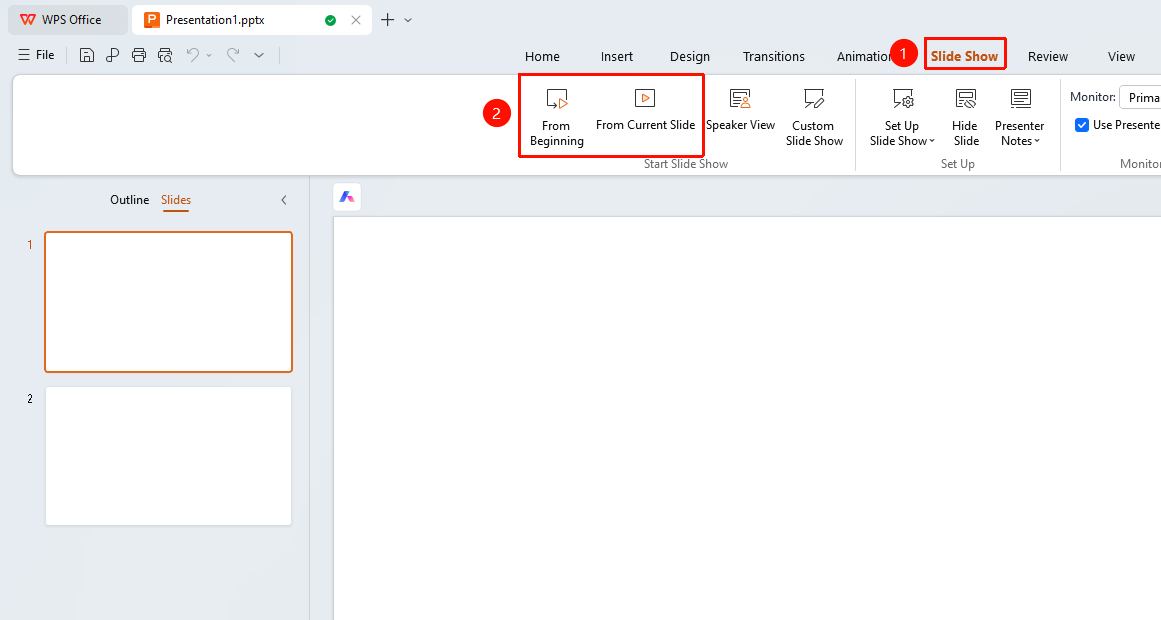
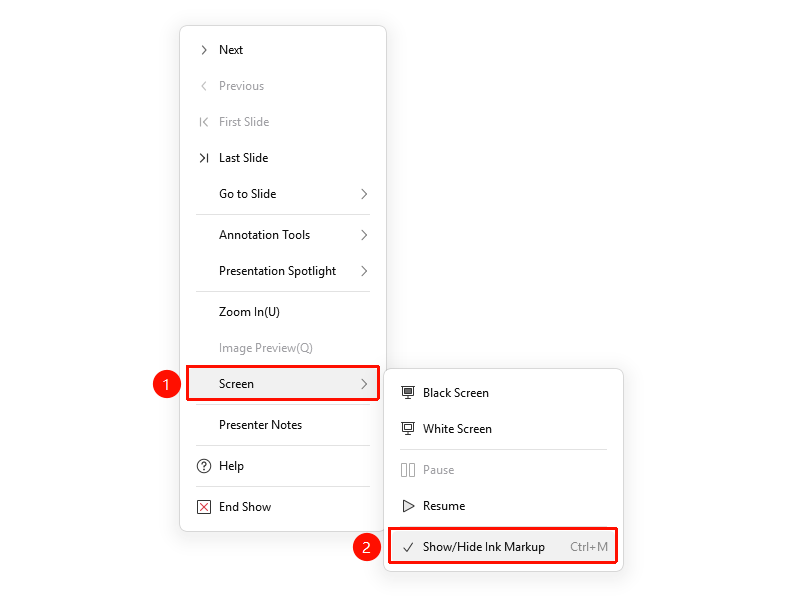
"Slideshow" tab → "From Beginning" / "From Current Slide" → Right-click menu → "Screen" → "Show/Hide Ink Markup"
- Click the top "Slideshow" tab, select "From Beginning" / "From Current Slide" to enter slideshow mode
- Right-click the slide in presentation mode
- Select "Screen" → "Show/Hide Ink Markup"
- Control whether ink annotations are shown or hidden
FAQ
Q1: Will hiding ink markup delete the ink?
- Solution: No, hiding only temporarily stops the display; the ink remains on the slide.
Notes
- Show/Hide Ink Markup is only available in presentation mode
- Hidden ink will automatically display again in the next presentation