Feature Summary
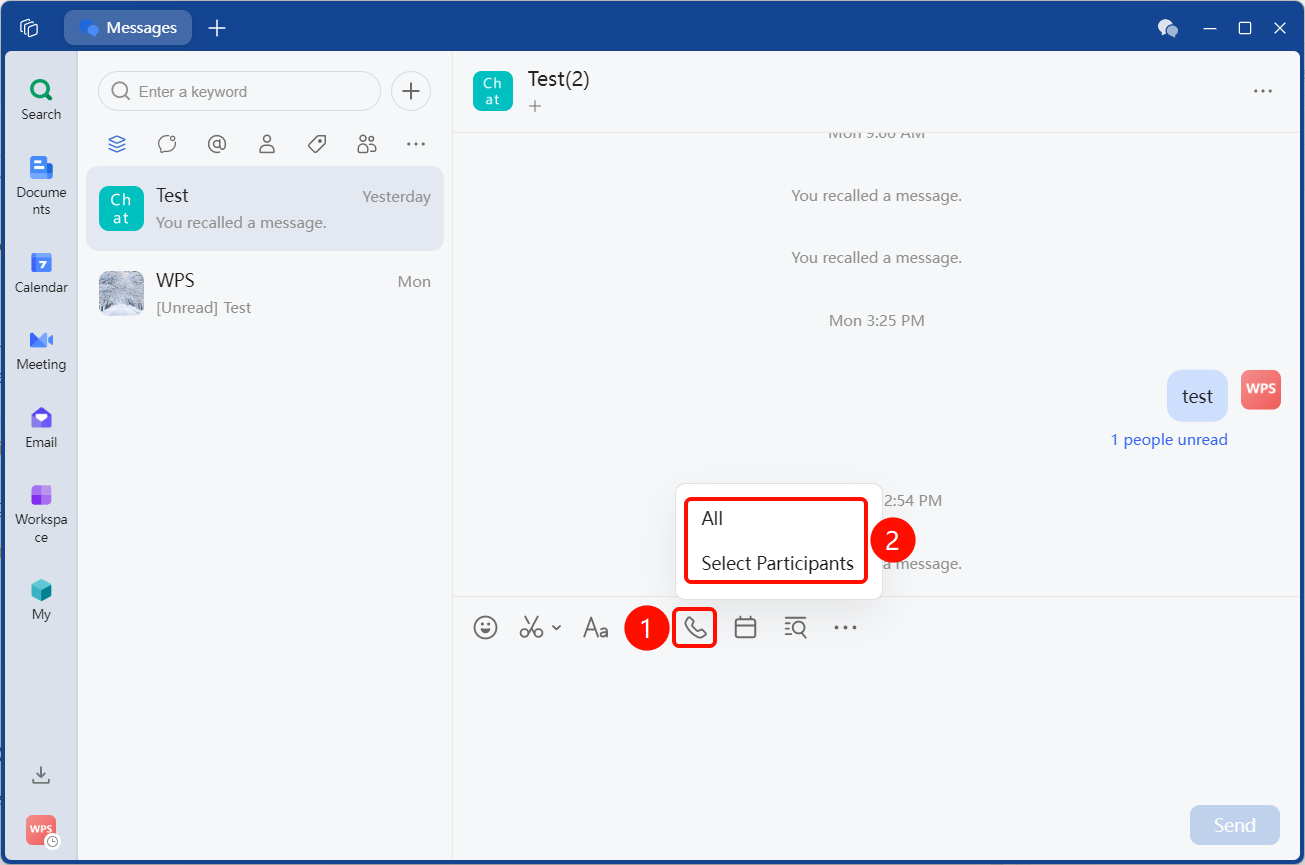
Support initiating a group voice meeting quickly via the phone/meeting button in the bottom toolbar of the group chat window, with the option to invite everyone or select specific participants.
Feature Description
| Feature Dimension | Description |
|---|---|
| Membership Restriction | No membership restriction |
| Version Restriction | No version restriction |
Steps
Managing Group Voice Meetings
Feature Entry
Group chat window → 「Bottom Toolbar」 → 「Meeting」 button
- Enter the target group chat window, find and click the phone icon in the bottom toolbar (hovering over it displays the "Meeting" tooltip)
- After clicking, a dropdown menu appears, where you can select 「All」 (invite all group members) or 「Select Participants」 (invite specific members)
- After selecting 「All」, a confirmation popup appears: "Are you sure you want to invite all group members to the meeting?" Click 「OK」 to start the meeting
- After selecting 「Select Participants」, a member selection window appears. Check the target members and click 「OK」 to start the meeting
- After the meeting is initiated, it automatically enters the meeting interface, and the initiator defaults to the "Host"
FAQ
Q1: Can new members who have not joined the group participate?
- Solution: Only group members can receive meeting invitations and join. It is recommended to invite members to the group first.
Q2: Is the initiator always the host?
- Solution: Yes, the member who initiates the meeting becomes the host by default. The host can manage participant permissions during the meeting.
Notes
- When selecting participants, searching for member names and selecting all are supported.