Feature Summary
Remove a specified conversation from the conversation list to clean up chats you no longer follow.
Feature Description
| Feature Dimension | Description |
|---|---|
| Membership Restriction | No membership restriction |
| Version Restriction | No version restriction |
Steps
Open the Right-Click Menu
Feature Entry
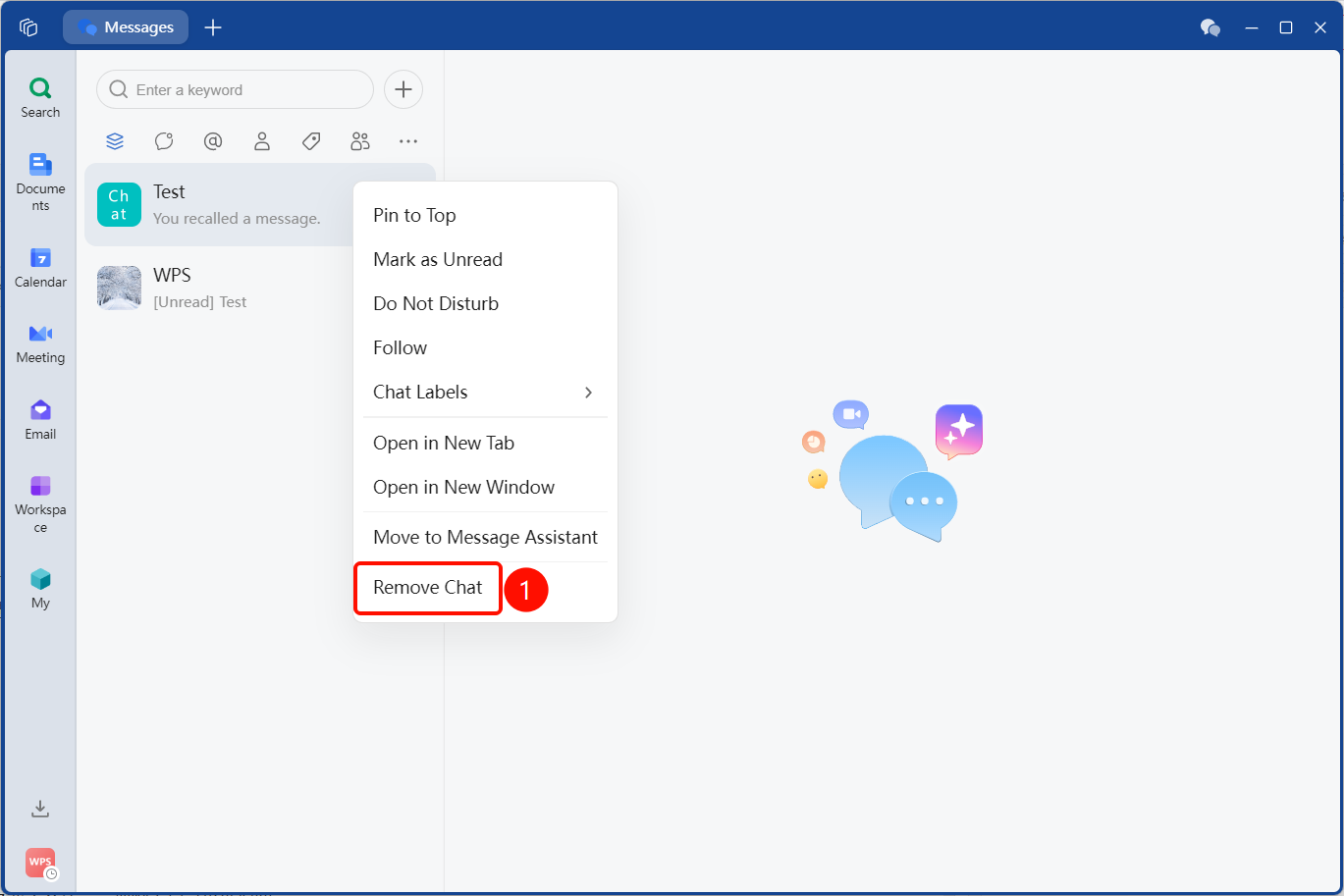
"Conversation List" → Right-click the target conversation → "Remove Chat"
- In the conversation list on the WPS Collaboration message page, find the conversation you want to remove.
- Right-click the conversation and select the "Remove Chat" option from the pop-up menu.
Confirm Removal
- After clicking "Remove Conversation", the conversation will be removed from the current conversation list.
- The conversation list will refresh automatically, and the removed conversation will no longer be displayed.
Notes
- Remove Conversation = Delete Chat History: The removal operation only hides the conversation from the conversation list; the Cloud chat history is still retained.
- How to Retrieve It: When the other party sends a message again, the conversation will reappear in the list.
Cautions
- Before removing a conversation, make sure the target conversation is correct to avoid accidentally removing an important conversation.
- If you need to view it again after removal, you can restart the conversation by searching for the contact or group chat.